
Best Gaming Monitors in 2026: Picks by Stated Refresh Rate
The best gaming monitor for a player depends on the stated specs that matter most: refresh rate, resolution, panel type and size. This guide opens with the ASUS ROG PG34WCDN, a 34-inch ultrawide whose listing states a 360Hz refresh, the highest in the list, plus a QHD 1440p resolution and an OLED panel. Every pick here comes from a pool of 43 monitors that state a refresh rate of 144Hz or more, compared on stated specifications and live prices.
14 picks from 53 gaming monitors that match this guide with a price we can quote today. Every price below is live and carries the moment it was read.
The picks at a glance
Which one should you buy?
- For a player who wants the highest stated refresh rate: A stated 360Hz puts the ASUS ROG PG34WCDN at the top of this list. The listing also gives it a QHD 1440p resolution and an OLED panel at 34 inches. See pick 1
- For a player who plays at 4K: The GIGABYTE MO27U2 states a 4K UHD resolution at 240Hz on an OLED panel, a combination that keeps it in the top half of this list. See pick 5
- For a player who wants a travel-friendly screen: The ARZOPA 16.1-inch portable states a 144Hz refresh on an IPS panel at FHD 1080p. It is the smallest screen in the list, built to move. See pick 14
- For a player using an NVIDIA graphics card: Listings that state G-SYNC, such as the AOC 27 4K Mini-LED at 320Hz, pair with NVIDIA graphics cards; NVIDIA's G-SYNC page describes the validation. This pick also states 4K UHD and a 27-inch size. See pick 2
The 14 picks
1 Highest stated refresh rate in the list

ASUS ROG PG34WCDN 34 Inch 1440p 360Hz Ultrawide RGB OLED Gaming Monitor
- Size
- 34 in
- Resolution
- QHD 1440p
- Refresh
- 360 Hz
- Panel
- OLED
$1,299.00 price as of 2026-10-14 05:35 UTC (Details)
This pick leads the ranking because its listing states the highest refresh rate in the list, 360Hz. Its QHD 1440p resolution and OLED panel place it above every other monitor by the ordering rule, which weighs refresh rate before resolution.
Pros
- Stated 360Hz refresh rate, the highest in the list
- QHD 1440p resolution
- OLED panel stated
- 34-inch stated size
Cons
- HDR performance tier not stated by the seller
- 34-inch width needs a wide desk
Good fit if
- For a player who wants the highest stated refresh rate in the list
- For a player who wants an OLED ultrawide at QHD resolution
Skip if
- For a player who wants a 4K resolution
- For a player who wants a screen smaller than 34 inches
Verdict: The ASUS ROG PG34WCDN tops this guide with a stated 360Hz refresh, QHD resolution and an OLED panel.
2 Highest stated refresh rate alongside 4K

AOC 27" Gaming Monitor 4K Mini-LED Dual Mode 320Hz NVIDIA G-SYNC U27G4XM
- Size
- 27 in
- Resolution
- 4K UHD
- Refresh
- 320 Hz
$349.99 price as of 2026-10-14 05:32 UTC (Details)
The listing states 320Hz, the second-highest refresh rate here, with a 4K UHD resolution. It ranks just below the 360Hz OLED pick because refresh rate comes first in the ordering rule.
Pros
- Stated 320Hz refresh rate
- 4K UHD resolution
- NVIDIA G-SYNC stated in the listing name
- 27-inch stated size
Cons
- Panel type not stated by the seller
- A stated 320Hz at 4K asks for a capable graphics card to make use of it
Good fit if
- For a player who wants 4K with a very high stated refresh rate
- For a player who uses an NVIDIA graphics card
Skip if
- For a player who wants a stated panel type
- For a player who wants an ultrawide screen
Verdict: The AOC 27 4K Mini-LED is the second pick on a stated 320Hz refresh and a 4K UHD resolution.
3 Highest stated refresh rate at FHD

Acer Nitro 24.5in FHD 1920x1080 280Hz Gaming Monitor KG251Q Z1biip
- Size
- 24.5 in
- Resolution
- FHD 1080p
- Refresh
- 280 Hz
$129.99 price as of 2026-10-14 05:26 UTC (Details)
A stated 280Hz is the highest refresh rate at FHD 1080p in this list. The panel type is not stated, so the pick sits below the 320Hz 4K monitor and above the 250Hz QHD monitor by refresh.
Pros
- Stated 280Hz refresh rate
- FHD 1920x1080 resolution
- 24.5-inch stated size
Cons
- Panel type not stated by the seller
- FHD 1080p is the lower resolution tier in this list
Good fit if
- For a player who wants the highest stated refresh rate at FHD
- For a player who keeps a 24-inch class screen
Skip if
- For a player who wants QHD or 4K resolution
- For a player who wants a stated panel type
Verdict: The Acer Nitro 24.5in leads the FHD group on a stated 280Hz refresh rate.
4 Highest stated refresh rate at QHD

ASUS TUF Gaming VG34WQML5A 34 Inch 1440p 250Hz Ultrawide HDR Gaming
- Size
- 34 in
- Resolution
- QHD 1440p
- Refresh
- 250 Hz
$289.00 price as of 2026-10-14 05:36 UTC (Details)
A stated 250Hz is the highest refresh rate at QHD 1440p here. The 34-inch size and the HDR mention in the name keep it ahead of the 240Hz group below.
Pros
- Stated 250Hz refresh rate
- QHD 1440p resolution
- 34-inch stated size
- HDR stated in the listing name
Cons
- Panel type not stated by the seller
- HDR performance tier not stated by the seller
Good fit if
- For a player who wants QHD above 240Hz
- For a player who wants a 34-inch ultrawide
Skip if
- For a player who wants a stated panel type
- For a player who wants a 4K resolution
Verdict: The ASUS TUF Gaming VG34WQML5A is the QHD pick with the highest stated refresh rate, 250Hz.
5 4K OLED with a stated 240Hz refresh

GIGABYTE MO27U2 27" QD-OLED UHD AMD Freesync Premium Pro Gaming Monitor
- Size
- 27 in
- Resolution
- 4K UHD
- Refresh
- 240 Hz
- Panel
- OLED
$649.99 price as of 2026-10-14 06:14 UTC (Details)
The first 240Hz pick is placed by resolution: its stated 4K UHD outscores the 3440x1440 ultrawides that follow. An OLED panel and FreeSync Premium Pro are stated in the listing.
Pros
- Stated 240Hz refresh rate
- 4K UHD resolution
- OLED panel stated
- AMD FreeSync Premium Pro stated in the listing name
Cons
- HDR performance tier not stated by the seller
- 27-inch size is smaller than the 34-inch ultrawides in the same refresh group
Good fit if
- For a player who wants 4K on an OLED panel
- For a player using an AMD graphics card
Skip if
- For a player who wants an ultrawide aspect ratio
- For a player who wants an HDR tier stated
Verdict: The GIGABYTE MO27U2 pairs 4K UHD, OLED and a stated 240Hz refresh in 27 inches.
6 Curved QD-OLED ultrawide at 240Hz
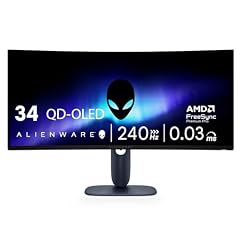
Alienware 34 240Hz QD-OLED Curved Gaming Monitor
- Size
- 34.2 in
- Resolution
- QHD 1440p
- Refresh
- 240 Hz
- Panel
- OLED
$699.99 price as of 2026-10-14 05:29 UTC (Details)
This 240Hz ultrawide ranks after the GIGABYTE because its stated QHD 1440p has fewer pixels than 4K UHD. The listing states a QD-OLED panel and an 1800R curve.
Pros
- Stated 240Hz refresh rate
- QD-OLED panel stated
- QHD 1440p resolution
- 34.2-inch stated size
Cons
- HDR performance tier not stated by the seller
- The stated QHD 1440p has fewer pixels than the 4K pick above it
Good fit if
- For a player who wants a curved OLED ultrawide
- For a player who wants QHD 1440p resolution
Skip if
- For a player who wants a 4K resolution
- For a player who wants a flat screen
Verdict: The Alienware AW3425DW is a 34.2-inch QD-OLED with a stated 240Hz refresh and an 1800R curve.
7 240Hz ultrawide with a stated VA panel

AOC 34" Curved Gaming Monitor UWQHD 240Hz VA AMD FreeSync Premium
- Size
- 34 in
- Resolution
- 3440x1440
- Refresh
- 240 Hz
- Panel
- VA
$279.99 price as of 2026-10-14 05:32 UTC (Details)
Another 240Hz ultrawide, this pick ties the Alienware on refresh and resolution but shows a smaller stated 34-inch size. The listing states a VA panel and AMD FreeSync Premium.
Pros
- Stated 240Hz refresh rate
- 3440x1440 resolution
- VA panel stated
- AMD FreeSync Premium stated in the listing name
Cons
- HDR performance tier not stated by the seller
- The 3440x1440 resolution has fewer pixels than the 4K pick above it
Good fit if
- For a player who wants a 34-inch VA ultrawide at 240Hz
- For a player using an AMD graphics card
Skip if
- For a player who wants 4K resolution
- For a player who wants an OLED panel
Verdict: The AOC CU34G4Z is a 34-inch VA ultrawide with a stated 240Hz refresh and FreeSync Premium.
8 240Hz IPS at the FHD resolution

Dell 27 240Hz Gaming Monitor
- Size
- 27 in
- Resolution
- FHD 1080p
- Refresh
- 240 Hz
- Panel
- IPS
$149.99 price as of 2026-10-14 05:55 UTC (Details)
The last 240Hz pick states FHD 1920x1080, the fewest pixels in the 240Hz group. An IPS panel is stated, and it keeps the 240Hz tier available at a smaller resolution.
Pros
- Stated 240Hz refresh rate
- IPS panel stated
- FHD 1920x1080 resolution
- 27-inch stated size
Cons
- HDR performance tier not stated by the seller
- FHD 1080p resolution on a 27-inch screen states fewer pixels than the QHD and 4K picks
Good fit if
- For a player who wants 240Hz at FHD
- For a player who wants a 27-inch IPS screen
Skip if
- For a player who wants QHD or 4K resolution
- For a player who wants an ultrawide
Verdict: The Dell SE2726HG brings a stated 240Hz refresh to a 27-inch IPS panel at FHD.
9 Compact 200Hz IPS with G-SYNC Compatible stated

AOC 24" Gaming Monitor FHD 200Hz IPS NVIDIA G-SYNC Compatible 0.3ms
- Size
- 24 in
- Resolution
- FHD 1080p
- Refresh
- 200 Hz
- Panel
- IPS
$83.99 price as of 2026-10-14 05:31 UTC (Details)
A stated 200Hz refresh puts this 24-inch IPS monitor below the 240Hz group. The listing also states NVIDIA G-SYNC Compatible.
Pros
- Stated 200Hz refresh rate
- IPS panel stated
- NVIDIA G-SYNC Compatible stated in the listing name
- FHD 1920x1080 resolution
Cons
- HDR performance tier not stated by the seller
- 24-inch size is smaller than the 27-inch FHD pick above it
Good fit if
- For a player who wants a compact 24-inch screen at 200Hz
- For a player using an NVIDIA graphics card
Skip if
- For a player who wants a screen larger than 24 inches
- For a player who wants a refresh rate above 200Hz
Verdict: The AOC 24G42HE is a compact 24-inch IPS with a stated 200Hz refresh and G-SYNC Compatible.
10 34-inch ultrawide at a stated 180Hz

ASUS TUF Gaming VG34VQ3B 34 Inch 1440p 180Hz Ultrawide HDR Gaming
- Size
- 34 in
- Resolution
- QHD 1440p
- Refresh
- 180 Hz
$279.00 price as of 2026-10-14 05:36 UTC (Details)
At a stated 180Hz, this 34-inch ultrawide outranks the 2560x1440 QHD pick because it carries more pixels. The panel type is not stated.
Pros
- Stated 180Hz refresh rate
- QHD 3440x1440 resolution
- 34-inch stated size
- HDR stated in the listing name
Cons
- Panel type not stated by the seller
- HDR performance tier not stated by the seller
Good fit if
- For a player who wants a 34-inch ultrawide at 180Hz
- For a player who wants 3440x1440 resolution
Skip if
- For a player who wants a stated panel type
- For a player who wants a refresh rate above 180Hz
Verdict: The ASUS TUF Gaming VG34VQ3B is a 34-inch ultrawide with a stated 180Hz refresh and QHD resolution.
11 27-inch QHD IPS at 180Hz

Acer Nitro 27in QHD 2560x1440 IPS 180Hz Gaming Monitor KG271U N3bmiipx
- Size
- 27 in
- Resolution
- QHD 1440p
- Refresh
- 180 Hz
- Panel
- IPS
$159.99 price as of 2026-10-14 05:26 UTC (Details)
This 27-inch QHD pick also states 180Hz but carries fewer pixels than the 3440x1440 ultrawide above it. The listing states an IPS panel.
Pros
- Stated 180Hz refresh rate
- IPS panel stated
- QHD 2560x1440 resolution
- 27-inch stated size
Cons
- HDR performance tier not stated by the seller
- 2560x1440 resolution has fewer pixels than the 3440x1440 ultrawide pick above it
Good fit if
- For a player who wants QHD on a 27-inch IPS
- For a player who wants 180Hz without an ultrawide shape
Skip if
- For a player who wants 4K resolution
- For a player who wants a 34-inch screen
Verdict: The Acer Nitro KG271U is a 27-inch IPS with a stated 180Hz refresh at QHD.
12 4K IPS with a stated dual refresh rate

Acer Nitro 27in 4K 3840x2160 IPS 160Hz DFR 320Hz Gaming Monitor VG270K
- Size
- 27 in
- Resolution
- 4K UHD
- Refresh
- 160 Hz
- Panel
- IPS
$269.99 price as of 2026-10-14 05:26 UTC (Details)
A stated 160Hz with a 320Hz dual mode puts this 4K IPS monitor above the 144Hz group. It ranks below the 180Hz picks by the ordering rule.
Pros
- Stated 160Hz refresh rate with a stated 320Hz dual mode
- 4K UHD resolution
- IPS panel stated
- 27-inch stated size
Cons
- HDR performance tier not stated by the seller
- The dual 320Hz mode is a stated feature, not a measured refresh rate
Good fit if
- For a player who wants 4K with a refresh above 144Hz
- For a player who wants an IPS panel
Skip if
- For a player who wants a refresh rate above 180Hz
- For a player who wants an ultrawide
Verdict: The Acer Nitro VG270K V4 states a 160Hz refresh with a 320Hz dual mode at 4K on IPS.
13 QHD with stated USB-C connectivity

Dell 27 Plus QHD USB-C Monitor
- Size
- 27 in
- Resolution
- QHD 1440p
- Refresh
- 144 Hz
$244.99 price as of 2026-10-14 05:55 UTC (Details)
The stated 144Hz refresh rate is the lowest tier in this list, but the QHD 2560x1440 resolution and USB-C connectivity are stated. It ranks above the portable pick by a larger screen.
Pros
- Stated 144Hz refresh rate
- QHD 2560x1440 resolution
- USB-C stated in the listing name
- 27-inch stated size
Cons
- Panel type not stated by the seller
- 144Hz is the lowest refresh tier in this list
Good fit if
- For a player who wants QHD with USB-C
- For a player who wants stated built-in speakers
Skip if
- For a player who wants a refresh rate above 144Hz
- For a player who wants a stated panel type
Verdict: The Dell S2725DC is a 27-inch QHD monitor with a stated 144Hz refresh and USB-C.
14 Portable 16.1-inch at a stated 144Hz

ARZOPA 16.1'' 144Hz Portable Gaming Monitor 106% sRGB-Z1FC Gray
- Size
- 16.1 in
- Resolution
- FHD 1080p
- Refresh
- 144 Hz
- Panel
- IPS
$109.99 price as of 2026-10-14 05:34 UTC (Details)
The ordering rule puts this portable last: a stated 144Hz at FHD 1080p on a 16.1-inch screen. The listing states an IPS panel and 106% sRGB.
Pros
- Stated 144Hz refresh rate
- IPS panel stated
- FHD 1080p resolution
- 16.1-inch portable stated size
Cons
- 16.1-inch size is the smallest in the list
- FHD 1080p is the lower resolution tier here
Good fit if
- For a player who wants a monitor that travels
- For a player who wants a 144Hz IPS panel in a small size
Skip if
- For a player who wants a desktop-sized screen
- For a player who wants QHD or 4K resolution
Verdict: The ARZOPA Z1FC is a 16.1-inch portable IPS with a stated 144Hz refresh at FHD.
Side by side
How we picked
This guide draws its picks from a pool of 43 gaming monitors whose listings state a refresh rate of 144Hz or more. The picks are ranked best first by stated refresh rate (highest first), then by stated resolution (higher pixel count first), then by stated screen size (largest first); ties are broken by the order in the pool file. Machines are compared only on the specifications stated in each listing and on live prices. Where a listing does not state a panel type, an HDR tier or another spec, the guide says so instead of guessing. The 14 picks below cover refresh rates from 144Hz to 360Hz, resolutions from FHD 1080p to 4K UHD, and screen sizes from a 16.1-inch portable to 34-inch ultrawides. No monitor here has been run or measured by the site; the comparison is a reading of stated specs and current prices.
How to choose
What the refresh rate decides
The refresh rate, stated in hertz, is how many times per second the listing says the screen can update. This pool holds only monitors that state 144Hz or more, and the ranking puts the highest stated rate first. A higher stated rate means the screen can accept more frames per second from a graphics card; the guide does not measure how many frames any card actually produces.
Resolution and screen size
Listings state a resolution in pixels: FHD 1080p (1920x1080), QHD 1440p (2560x1440 or 3440x1440 for ultrawides) and 4K UHD (3840x2160). More pixels can show more detail on screen. Size is stated in inches, from a 16.1-inch portable to 34.2-inch ultrawides; a larger screen with the same pixel count spreads those pixels over more area.
Panel types as stated
Some listings state the panel technology: IPS, VA or OLED. Others do not. The guide repeats what the listing says and writes "not stated by the seller" when it is missing. Panel type is one stated spec among several; the catalogue provides no measured brightness, contrast or color data.
Adaptive sync and variable refresh rate
Several listings state FreeSync, G-SYNC, G-SYNC Compatible or a variable refresh rate. NVIDIA's G-SYNC page describes displays validated to reduce tearing and stutter, and the HDMI VRR page describes how variable refresh rate reduces judder and frame tearing. The catalogue states which listings carry these names; it does not measure their behavior.
HDR when a listing states it
Some listing names state HDR, HDR400 or an HDR-related feature. VESA's DisplayHDR page defines performance tiers from DisplayHDR 400 upward, and Microsoft's HDR settings page describes turning on HDR in Windows. The guide takes HDR as a stated feature and never claims a measured HDR result.
What this guide leaves out (and why)
The site does not run or measure monitors. There are no brightness measurements, contrast ratios, color accuracy figures, response time results or frame rate counts here, because the catalogue has no data for them. The comparison is built on stated specifications and live prices, and that is the limit of this guide.
Questions
Does this guide measure brightness, contrast or color accuracy?
No. The catalogue has no data for brightness, contrast, color accuracy, response times or frame rates, and this site does not guess. The guide compares the refresh rate, resolution, panel type and size that each listing states, along with live prices. Where a listing is silent on a spec, the guide says "not stated by the seller".
What does a stated refresh rate of 144Hz or more mean?
The refresh rate, in hertz, is how many times per second the listing says the screen can update. This pool holds only monitors that state 144Hz or more. A higher stated rate can display more frames per second in fast games, but the actual number depends on the graphics card and the game, and this guide never measures or predicts it.
What are G-SYNC and FreeSync?
They are adaptive sync technologies named in several listings. NVIDIA's G-SYNC page describes displays validated by NVIDIA to reduce tearing and stutter, and FreeSync is AMD's counterpart, stated on some picks here. The guide repeats what each listing states and never claims how any monitor behaves.
What about HDR on a gaming monitor?
Some listing names state HDR or HDR400. VESA's DisplayHDR page describes performance tiers such as 400 and 600, and Microsoft's HDR settings page explains how to turn on HDR in Windows. The catalogue does not measure a monitor's HDR performance, so this guide treats HDR only as a stated feature.
Is a 4K monitor better than QHD or FHD?
A 4K UHD listing states 3840x2160 pixels, which is more than QHD 2560x1440 or FHD 1920x1080. More pixels can show more detail, but the best choice depends on the player's graphics card and the games played. This guide ranks by stated resolution after refresh rate and never promises a result.
Why do some picks have no stated panel type?
Because the seller's listing does not state one. The pool includes monitors whose names give the panel, like IPS, VA or OLED, and others that only give size, refresh rate and resolution. When a spec is missing, the guide writes "not stated by the seller" instead of filling it in.
Recent updates
- : First published.