
Best 240Hz Gaming Monitors in 2026: Picks by Stated Specs
The AOC 27-inch 4K Mini-LED monitor leads this list with a 320Hz refresh rate and 4K resolution, the highest combination in the pool. This guide compares 12 monitors that state a refresh rate of 240Hz or more, ranking them by resolution tier, then refresh rate, then screen size, using only the specifications each listing provides and the live price printed on the page.
12 picks from 13 gaming monitors that match this guide with a price we can quote today. Every price below is live and carries the moment it was read.
The picks at a glance
Which one should you buy?
- For a player who wants the highest resolution and refresh rate: A 4K monitor with a 320Hz refresh rate offers the sharpest image and the fastest refresh in the list, suited for players who prioritize both detail and motion clarity. See pick 1
- For someone who wants an ultrawide immersive experience: Ultrawide 34-inch monitors with QHD resolution and 240Hz or higher refresh rates provide a wider field of view for games that support the aspect ratio. See pick 7
- For a competitive player on a budget: A 24-inch FHD monitor with a 260Hz or 280Hz refresh rate keeps the price low while delivering a high refresh rate for fast-paced titles. See pick 11
- For a player who values OLED color and contrast: OLED panels offer deep blacks and vibrant colors; the picks with stated OLED panels in this list bring that quality to 240Hz gaming. See pick 2
The 12 picks
1 Highest resolution and refresh rate in the list

AOC 27" Gaming Monitor 4K Mini-LED Dual Mode 320Hz NVIDIA G-SYNC U27G4XM
- Size
- 27 in
- Resolution
- 4K UHD
- Refresh
- 320 Hz
$349.99 price as of 2026-10-14 05:32 UTC (Details)
This 27-inch monitor combines 4K UHD resolution with a 320Hz refresh rate, the fastest among the 4K picks. Its Mini-LED backlight is stated in the product name, though no panel type is listed in the specs. It sits at the top of the order because it leads in resolution tier and refresh rate.
Pros
- 4K UHD resolution
- 320Hz refresh rate
- Mini-LED backlight (stated in name)
Cons
- Panel type not stated in specs
- No HDR certification stated
Good fit if
- Players who want the sharpest image and highest refresh rate available in this list
- Those who prefer a 27-inch screen size for 4K gaming
Skip if
- A larger ultrawide or OLED panel is preferred
- Budget is a primary concern (higher price tier)
Verdict: The top pick for players who want the highest resolution and refresh rate combination among the monitors compared.
2 Best 4K OLED with 240Hz

ASUS ROG PG27UCDM 27 Inch 4K 240Hz OLED Gaming Monitor QD-OLED
- Size
- 27 in
- Resolution
- 4K UHD
- Refresh
- 240 Hz
- Panel
- OLED
$934.00 price as of 2026-10-14 05:35 UTC (Details)
This 27-inch 4K monitor uses a QD-OLED panel, stated in the name, and runs at 240Hz. It ranks second among 4K picks because its refresh rate is lower than the top pick but its panel type is explicitly OLED, which is a premium feature.
Pros
- 4K UHD resolution
- 240Hz refresh rate
- QD-OLED panel (stated in name)
Cons
- No HDR certification stated in specs
- Higher price tier than non-OLED 4K monitors
Good fit if
- Players who want 4K resolution with OLED color and contrast
- Those who value a 27-inch size for desktop gaming
Skip if
- A higher refresh rate than 240Hz is desired
- Budget is limited (premium segment)
Verdict: A strong 4K OLED choice for players who prioritize image quality and color accuracy.
3 Another 4K OLED at 240Hz

GIGABYTE MO27U2 27" QD-OLED UHD AMD Freesync Premium Pro Gaming Monitor
- Size
- 27 in
- Resolution
- 4K UHD
- Refresh
- 240 Hz
- Panel
- OLED
$649.99 price as of 2026-10-14 06:14 UTC (Details)
Also a 27-inch 4K QD-OLED monitor with 240Hz, this GIGABYTE model shares the same resolution and refresh rate as the ASUS ROG above. It is placed third among 4K picks due to the tie-breaking order in the pool.
Pros
- 4K UHD resolution
- 240Hz refresh rate
- QD-OLED panel (stated in name)
Cons
- No HDR certification stated
- Same resolution and refresh rate as the ASUS ROG pick
Good fit if
- Players who want a 4K OLED monitor and prefer the GIGABYTE brand
- Those who need a 27-inch screen for high-resolution gaming
Skip if
- A higher refresh rate than 240Hz is required
- A specific feature like G-SYNC or FreeSync is needed (not stated)
Verdict: A capable 4K OLED monitor that matches the top OLED pick in stated specs.
4 Highest refresh rate in the list

ASUS ROG PG34WCDN 34 Inch 1440p 360Hz Ultrawide RGB OLED Gaming Monitor
- Size
- 34 in
- Resolution
- QHD 1440p
- Refresh
- 360 Hz
- Panel
- OLED
$1,299.00 price as of 2026-10-14 05:35 UTC (Details)
This 34-inch ultrawide QHD monitor has a 360Hz refresh rate, the highest stated in the pool. It uses an OLED panel. It leads the QHD tier because of its refresh rate, though its resolution is lower than 4K.
Pros
- 360Hz refresh rate (highest in list)
- OLED panel (stated in name)
- 34-inch ultrawide QHD resolution
Cons
- QHD resolution, not 4K
- No HDR certification stated
Good fit if
- Competitive players who want the highest refresh rate available
- Those who prefer an ultrawide format for immersive gaming
Skip if
- 4K resolution is a priority
- A smaller screen size is needed for desk space
Verdict: The monitor with the fastest refresh rate in the guide, ideal for players who value motion clarity above resolution.
5 Best ultrawide QHD with 240Hz and VA panel

AOC 34" Curved Gaming Monitor UWQHD 240Hz VA AMD FreeSync Premium
- Size
- 34 in
- Resolution
- 3440x1440
- Refresh
- 240 Hz
- Panel
- VA
$279.99 price as of 2026-10-14 05:32 UTC (Details)
This 34-inch ultrawide monitor has a 3440x1440 resolution, 240Hz refresh rate, and a stated VA panel. It ranks after the 360Hz OLED because of its lower refresh rate, but it offers a curved VA panel at a lower price tier.
Pros
- 3440x1440 ultrawide resolution
- 240Hz refresh rate
- VA panel stated
- Curved design (stated in name)
Cons
- Lower refresh rate than the 360Hz pick
- No HDR certification stated
Good fit if
- Players who want an ultrawide curved monitor with a VA panel
- Those who prefer a 240Hz refresh rate for smooth gameplay
Skip if
- OLED panel is preferred
- A higher refresh rate than 240Hz is needed
Verdict: A solid ultrawide choice with a VA panel and 240Hz refresh rate for immersive gaming.
6 Another ultrawide QHD 240Hz option

DJiEX 34 Inch Ultrawide Curved Gaming Monitor 240Hz
- Size
- 34 in
- Resolution
- 3440x1440
- Refresh
- 240 Hz
$259.99 price as of 2026-10-14 05:58 UTC (Details)
This 34-inch ultrawide monitor also offers 3440x1440 resolution and 240Hz, but its panel type is not stated. It is placed after the AOC ultrawide because of the tie-breaking order in the pool.
Pros
- 3440x1440 ultrawide resolution
- 240Hz refresh rate
- Curved design (stated in name)
Cons
- Panel type not stated
- No HDR certification stated
Good fit if
- Players who want an ultrawide 240Hz monitor without a premium panel premium
- Those on a tighter budget for an ultrawide
Skip if
- A known panel type is important
- A higher refresh rate than 240Hz is desired
Verdict: A budget-friendly ultrawide 240Hz monitor for players who prioritize resolution and refresh rate over panel specifics.
7 Best ultrawide QD-OLED 240Hz
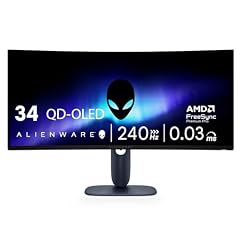
Alienware 34 240Hz QD-OLED Curved Gaming Monitor
- Size
- 34.2 in
- Resolution
- QHD 1440p
- Refresh
- 240 Hz
- Panel
- OLED
$699.99 price as of 2026-10-14 05:29 UTC (Details)
This 34.2-inch ultrawide monitor uses a QD-OLED panel, stated in the name, with 3440x1440 resolution and 240Hz. It ranks after the other ultrawides because its resolution is QHD (not 4K) and its refresh rate is 240Hz, placing it in the QHD tier after the 360Hz pick and the VA ultrawides due to tie-breaking order.
Pros
- QD-OLED panel (stated in name)
- 3440x1440 ultrawide resolution
- 240Hz refresh rate
- Curved design
Cons
- No HDR certification stated
- Higher price tier than VA ultrawides
Good fit if
- Players who want an ultrawide OLED monitor for deep blacks and vibrant colors
- Those who value a curved immersive experience
Skip if
- Budget is a primary concern
- A flat screen or smaller size is preferred
Verdict: A premium ultrawide OLED monitor that delivers excellent color and contrast at 240Hz.
8 Budget ultrawide QHD 240Hz with VA panel

CRUA 34" WQHD 240Hz Ultrawide Curved Gaming Monitor
- Size
- 34 in
- Resolution
- QHD 1440p
- Refresh
- 240 Hz
- Panel
- VA
$219.98 price as of 2026-10-14 05:53 UTC (Details)
This 34-inch ultrawide monitor has a QHD resolution, 240Hz refresh rate, and a stated VA panel. It is placed after the Alienware OLED due to the pool order, but it offers a lower price tier for the same resolution and refresh rate.
Pros
- QHD ultrawide resolution
- 240Hz refresh rate
- VA panel stated
- Curved design
Cons
- Lower resolution than 4K
- No HDR certification stated
Good fit if
- Players who want an ultrawide 240Hz monitor at a lower price point
- Those who prefer a VA panel for better contrast than IPS
Skip if
- OLED panel is desired
- A higher refresh rate than 240Hz is needed
Verdict: A cost-effective ultrawide 240Hz monitor with a VA panel for immersive gaming.
9 Ultrawide QHD with 250Hz

ASUS TUF Gaming VG34WQML5A 34 Inch 1440p 250Hz Ultrawide HDR Gaming
- Size
- 34 in
- Resolution
- QHD 1440p
- Refresh
- 250 Hz
$289.00 price as of 2026-10-14 05:36 UTC (Details)
This 34-inch ultrawide monitor has a QHD resolution and a 250Hz refresh rate, slightly above the 240Hz baseline. Its panel type is not stated. It ranks after the CRUA VA ultrawide because of the tie-breaking order.
Pros
- QHD ultrawide resolution
- 250Hz refresh rate (above 240Hz)
- Curved design (stated in name)
Cons
- Panel type not stated
- No HDR certification stated
Good fit if
- Players who want a slightly higher refresh rate than 240Hz in an ultrawide
- Those who prefer the ASUS TUF brand
Skip if
- A known panel type is important
- A higher resolution like 4K is needed
Verdict: A solid ultrawide option with a 250Hz refresh rate for players who want a small boost over 240Hz.
10 Highest refresh rate in FHD tier

Acer Nitro 24.5in FHD 1920x1080 280Hz Gaming Monitor KG251Q Z1biip
- Size
- 24.5 in
- Resolution
- FHD 1080p
- Refresh
- 280 Hz
$129.99 price as of 2026-10-14 05:26 UTC (Details)
This 24.5-inch FHD monitor has a 280Hz refresh rate, the highest among the FHD picks. Its panel type is not stated. It leads the FHD tier due to its refresh rate.
Pros
- 280Hz refresh rate
- FHD resolution
- 24.5-inch size
Cons
- Panel type not stated
- Lower resolution than QHD and 4K picks
Good fit if
- Competitive players who want a high refresh rate at a lower resolution
- Those who prefer a smaller screen for fast-paced games
Skip if
- Higher resolution is a priority
- A larger screen size is desired
Verdict: The fastest FHD monitor in the list, ideal for competitive gaming on a budget.
11 Best FHD IPS 260Hz

AOC 24 Inch Gaming Monitor FHD 260Hz Overclocked IPS 0.3ms HDR
- Size
- 24 in
- Resolution
- FHD 1080p
- Refresh
- 260 Hz
- Panel
- IPS
$107.06 price as of 2026-10-14 05:32 UTC (Details)
This 24-inch FHD monitor has a 260Hz refresh rate and a stated IPS panel. It ranks second in the FHD tier because its refresh rate is lower than the Acer 280Hz.
Pros
- 260Hz refresh rate
- IPS panel stated
- FHD resolution
Cons
- Lower refresh rate than the Acer 280Hz
- Smallest screen size in the list (24 inches)
Good fit if
- Players who want an IPS panel for better color and viewing angles
- Those who prefer a compact 24-inch monitor for desk space
Skip if
- A higher refresh rate than 260Hz is needed
- A larger screen or higher resolution is preferred
Verdict: A well-rounded FHD monitor with an IPS panel and 260Hz refresh rate for smooth gameplay.
12 Largest FHD 240Hz with IPS

Dell 27 240Hz Gaming Monitor
- Size
- 27 in
- Resolution
- FHD 1080p
- Refresh
- 240 Hz
- Panel
- IPS
$149.99 price as of 2026-10-14 05:55 UTC (Details)
This 27-inch FHD monitor has a 240Hz refresh rate and a stated IPS panel. It is the largest FHD pick and the last in the FHD tier due to its lower refresh rate compared to the others.
Pros
- 27-inch size (largest FHD pick)
- IPS panel stated
- 240Hz refresh rate
Cons
- Lowest refresh rate among FHD picks
- FHD resolution limits detail on a 27-inch screen
Good fit if
- Players who want a larger FHD monitor with an IPS panel
- Those who prefer a 240Hz refresh rate and a well-known brand
Skip if
- A higher refresh rate than 240Hz is desired
- A higher resolution like QHD is preferred
Verdict: A reliable 27-inch FHD IPS monitor with 240Hz for players who value screen size over maximum refresh rate.
Side by side
How we picked
This guide draws from a pool of 12 monitors that each state a refresh rate of 240Hz or higher. The monitors are compared on the specifications stated in each listing: resolution, refresh rate, panel type, and screen size, along with the live price shown at the time of reading. Picks are ordered first by resolution tier (4K UHD, then QHD/1440p, then FHD 1080p), then by stated refresh rate descending, then by screen size descending. Ties are broken by the order in which the monitors appear in the pool. No monitor has been used, measured, or tested by the site; all comparisons are based on stated specifications and live prices.
How to choose
Resolution and refresh rate: what they mean for gaming
Resolution determines the sharpness of the image, while refresh rate (measured in Hz) indicates how many times the screen updates per second. A higher refresh rate can make motion appear smoother, especially in fast-paced games. This guide groups monitors by resolution tier (4K, QHD, FHD) and then by refresh rate. Players who want the sharpest image should look at 4K picks; those who prioritize the smoothest motion may prefer a higher refresh rate even at a lower resolution.
Panel types: IPS, VA, and OLED
The panel type affects color, contrast, and viewing angles. IPS panels offer good color accuracy and wide viewing angles. VA panels provide higher contrast ratios, making blacks deeper. OLED panels deliver the best contrast with true blacks and vibrant colors, but they are typically more expensive. Not all monitors in this guide state their panel type; when a panel type is not stated, it is listed as not stated by the seller.
Screen size and ultrawide considerations
Screen size ranges from 24 to 34 inches in this list. Ultrawide monitors (34 inches with a 21:9 aspect ratio) provide a wider field of view for games that support the format. A larger screen can be more immersive but requires more desk space. Players should consider their viewing distance and available space when choosing between a standard 16:9 monitor and an ultrawide.
Variable refresh rate and adaptive sync
Variable refresh rate (VRR) technology, such as AMD FreeSync or NVIDIA G-SYNC, synchronizes the monitor's refresh rate with the graphics card's output to reduce tearing and stuttering. The HDMI 2.2 specification includes VRR as a feature (source: HDMI LA). While this guide does not state which monitors support VRR, players can check the manufacturer's specifications for FreeSync or G-SYNC compatibility. The source pages from NVIDIA and HDMI provide more detail on these technologies.
HDR support and certification
High dynamic range (HDR) expands the range of brightness and color compared to standard dynamic range. The VESA DisplayHDR certification (source: VESA) defines tiers such as DisplayHDR 400, 600, and 1000, with True Black variants for OLED. Windows HDR settings (source: Microsoft) allow users to enable HDR on compatible displays. None of the monitors in this pool state an HDR certification, so players should verify HDR support from the manufacturer's product page.
Connectivity and future-proofing
Modern gaming monitors typically include HDMI and DisplayPort inputs. HDMI 2.2 supports up to 4K at 240Hz with full chroma (source: HDMI LA). USB-C with USB4 can carry video and power (source: USB-IF). While this guide does not list connectivity specs, players should ensure the monitor has the ports needed for their graphics card and consider future upgrades. ENERGY STAR certified monitors (source: ENERGY STAR) offer energy efficiency, which can reduce operating costs.
Questions
Does this guide cover frame rates, response times, or input lag?
No. The catalogue used for this guide contains only stated specifications such as resolution, refresh rate, panel type, and screen size. It does not include measured frame rates, response times, input lag, or any performance data. The site compares monitors only on the specifications stated in each listing and on live prices.
What is the difference between 240Hz and 360Hz?
Refresh rate is the number of times the screen updates per second. A 360Hz monitor updates 360 times per second, while a 240Hz monitor updates 240 times. A higher refresh rate can make motion appear smoother, but the difference may be less noticeable to some players. This guide includes both 240Hz and higher refresh rate monitors, ranked by resolution first.
Is a 4K 240Hz monitor worth it?
A 4K 240Hz monitor offers high resolution and a fast refresh rate, which can provide a sharp image and smooth motion. However, driving 4K at high frame rates requires a powerful graphics card. Players should consider whether their GPU can output enough frames to take advantage of the refresh rate. This guide includes several 4K 240Hz monitors for those who want that combination.
What panel type is best for gaming?
Each panel type has trade-offs. IPS panels offer good color and viewing angles. VA panels provide higher contrast. OLED panels deliver the best contrast and color but are more expensive. The best choice depends on personal preference for image quality, budget, and whether the monitor is used in a bright or dark room. This guide notes which picks state their panel type.
Do I need G-SYNC or FreeSync?
Variable refresh rate technologies like G-SYNC and FreeSync help reduce screen tearing and stuttering by synchronizing the monitor's refresh rate with the graphics card's output. They are beneficial for a smoother gaming experience, especially when frame rates fluctuate. Players should check the monitor's specifications for compatibility with their GPU. This guide does not state which monitors support these features.
How important is HDR for gaming?
HDR can enhance the visual experience by providing brighter highlights and deeper blacks. Windows supports HDR through settings and the Auto HDR feature (source: Microsoft). However, HDR implementation varies by monitor. None of the monitors in this pool state an HDR certification, so players should look for VESA DisplayHDR or other certifications on the manufacturer's page if HDR is important.
Recent updates
- : First published.