
Best Prebuilt Gaming PC Under $1,900 in 2026: Top Picks by Specs
The best prebuilt gaming PC under $1,900 is the CyberPowerPC with an RTX 5060 Ti and 16GB of graphics memory, the most in this guide. It pairs that with 32GB of RAM and 2TB of storage, making it a strong choice for players who want room for large games. This guide compares eight desktops on their stated specifications and live prices, ranked by graphics memory first.
8 picks from 7 gaming PCs that match this guide with a price we can quote today. Every price below is live and carries the moment it was read.
The picks at a glance
| # | Pick | Gaming PC | Price |
|---|---|---|---|
| 1 | Most graphics memory here | CyberPowerPC Gaming PC | $1,869.99 price as of 2026-10-14 05:54 UTC (Details) |
| 2 | Tied for most graphics memory | Lenovo Legion Gaming Bundle | |
| 3 | Best RTX 5070 with 32GB RAM | msi Aegis ZS2 5070 Gaming Tower Desktop | $1,899.00 price as of 2026-10-14 07:05 UTC (Details) |
| 4 | RTX 5070 with 32GB RAM | Skytech Gaming PC Desktop | $1,899.99 price as of 2026-10-14 08:05 UTC (Details) |
| 5 | RTX 5070 with 24GB RAM | Skytech Gaming PC Azure 3 | $1,899.99 price as of 2026-10-14 08:05 UTC (Details) |
| 6 | RTX 5070 with 16GB RAM | Acer Nitro 85 Gaming Desktop | $1,899.99 price as of 2026-10-14 05:26 UTC (Details) |
| 7 | RTX 5060 with 32GB RAM | Skytech Gaming Archangel 5 Gaming PC | $1,899.99 price as of 2026-10-13 23:05 UTC (Details) |
| 8 | RTX 5060 with 32GB RAM | Dell Tower Desktop Computer 2026 | $1,856.99 price as of 2026-10-14 05:56 UTC (Details) |
Which one should you buy?
- For a player who wants the most graphics memory: This pick offers 16GB of graphics memory, the highest in this guide, which can hold larger textures and scenes. See pick 1
- For someone who streams while playing: With 32GB of RAM and a 2TB drive, this machine has room for the game, streaming software, and a large library. See pick 1
- For a player building a large game library: This pick offers 2TB of storage, the most in this guide, giving plenty of space for many games. See pick 1
- For a player who wants a balanced RTX 5070 setup: This machine pairs an RTX 5070 with 32GB of RAM and 1TB of storage, a common combination for gaming. See pick 3
The 8 picks
1 Most graphics memory here

CyberPowerPC Gaming PC
- CPU
- AMD Ryzen 7 8700F
- GPU
- GeForce RTX 5060 Ti
- GPU memory
- 16 GB
- RAM
- 32 GB
- Storage
- 2000 GB
- OS
- Windows 11 Home
- Dedicated graphics card
- Yes
$1,869.99 price as of 2026-10-14 05:54 UTC (Details)
This pick leads the list with 16GB of graphics memory, the most among the eight machines. It also offers 32GB of RAM and 2TB of storage, the largest storage in this guide, placing it ahead on the ranking rule.
Pros
- 16GB graphics memory, the most in this guide
- 32GB RAM for multitasking
- 2TB storage, the largest here
Cons
- Operating system not stated by the seller
- RTX 5060 Ti has less graphics memory than some RTX 5070 models in other guides
Good fit if
- Players who want the most graphics memory for detailed scenes
- Those who need ample storage for a large game library
Skip if
- You prefer a newer RTX 5070 GPU
- You need a stated operating system in the listing
Verdict: This is the top pick for its 16GB graphics memory and 2TB storage, offering the most headroom for gaming.
2 Tied for most graphics memory

Lenovo Legion Gaming Bundle
- CPU
- Intel Core Ultra 7 265F
- GPU
- RTX 5060 Ti
- GPU memory
- 16 GB
- Storage
- 1000 GB
- Dedicated graphics card
- Yes
This pick also states 16GB of graphics memory, tying with the top pick, but it has less RAM (16GB) and storage (1TB), so it ranks second on the ordering rule.
Pros
- 16GB graphics memory, tied for the most here
- RTX 5060 Ti GPU
- 1TB storage
Cons
- RAM and operating system not stated by the seller
- Less RAM than the top pick
Good fit if
- Players who want high graphics memory without extra storage
- Those who prioritize GPU memory over RAM
Skip if
- You need more than 16GB of RAM
- You want a stated operating system
Verdict: A solid choice for graphics memory, but with less RAM and storage than the top pick.
3 Best RTX 5070 with 32GB RAM

msi Aegis ZS2 5070 Gaming Tower Desktop
- CPU
- AMD Ryzen 7 8700F
- GPU
- GeForce RTX 5070
- GPU memory
- 12 GB
- RAM
- 32 GB
- Storage
- 1000 GB
- OS
- Windows 11 Home
- Dedicated graphics card
- Yes
$1,899.00 price as of 2026-10-14 07:05 UTC (Details)
This pick has 12GB of graphics memory, less than the top two, but it pairs an RTX 5070 with 32GB of RAM and 1TB of storage, ranking third on the rule.
Pros
- RTX 5070 GPU
- 32GB RAM
- 1TB storage
Cons
- 12GB graphics memory, less than the top picks
- Operating system not stated by the seller
Good fit if
- Players who want a newer RTX 5070 with ample RAM
- Those who stream or multitask while gaming
Skip if
- You need more than 12GB of graphics memory
- You prefer a stated operating system
Verdict: A balanced RTX 5070 machine with 32GB RAM, but with less graphics memory than the leaders.
4 RTX 5070 with 32GB RAM
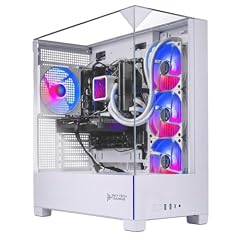
Skytech Gaming PC Desktop
- CPU
- Intel Core i7-14700F
- GPU
- RTX 5070
- GPU memory
- 12 GB
- RAM
- 32 GB
- Storage
- 1000 GB
- OS
- Windows 11 Home
- Dedicated graphics card
- Yes
$1,899.99 price as of 2026-10-14 08:05 UTC (Details)
This pick also has 12GB of graphics memory and 32GB of RAM, but with 1TB storage, it ties with the MSI on the rule; it ranks after due to pool order.
Pros
- RTX 5070 GPU
- 32GB RAM
- 1TB storage
Cons
- 12GB graphics memory, less than the top picks
- Same specs as the MSI pick, but lower in pool order
Good fit if
- Players who want an RTX 5070 with 32GB RAM
- Those who prefer an Intel i7 CPU
Skip if
- You need more graphics memory
- You want a different brand or bundle
Verdict: A strong RTX 5070 option with 32GB RAM, similar to the MSI but ranked after it.
5 RTX 5070 with 24GB RAM

Skytech Gaming PC Azure 3
- CPU
- AMD Ryzen 7 7700X
- GPU
- RTX 5070
- GPU memory
- 12 GB
- RAM
- 24 GB
- Storage
- 1000 GB
- OS
- Windows 11 Home
- Dedicated graphics card
- Yes
$1,899.99 price as of 2026-10-14 08:05 UTC (Details)
This pick has 12GB of graphics memory, but only 24GB of RAM, so it ranks below the 32GB RTX 5070 machines on the ordering rule.
Pros
- RTX 5070 GPU
- 24GB RAM
- 1TB storage
Cons
- Less RAM than the 32GB RTX 5070 picks
- 12GB graphics memory, less than the top two
Good fit if
- Players who want an RTX 5070 with a bit less RAM
- Those who prefer a Ryzen 7 7700X CPU
Skip if
- You need 32GB of RAM
- You want more graphics memory
Verdict: A capable RTX 5070 machine, but with less RAM than its peers.
6 RTX 5070 with 16GB RAM

Acer Nitro 85 Gaming Desktop
- CPU
- Intel Core Ultra 7 265F
- GPU
- GeForce RTX 5070
- RAM
- 16 GB
- Storage
- 1000 GB
- OS
- Windows 11 Home
- Dedicated graphics card
- Yes
$1,899.99 price as of 2026-10-14 05:26 UTC (Details)
This pick has 12GB of graphics memory, but only 16GB of RAM, so it ranks lower on the rule, despite the RTX 5070 GPU.
Pros
- RTX 5070 GPU
- 1TB storage
- Windows 11 Home stated
Cons
- 16GB RAM, the least in this guide
- 12GB graphics memory, less than the top picks
Good fit if
- Players who want an RTX 5070 on a budget
- Those who don't need much RAM
Skip if
- You multitask heavily or stream
- You want more than 16GB of RAM
Verdict: An RTX 5070 machine with minimal RAM, suitable for lighter gaming sessions.
7 RTX 5060 with 32GB RAM

Skytech Gaming Archangel 5 Gaming PC
- CPU
- AMD Ryzen 7 7700
- GPU
- RTX 5060
- GPU memory
- 8 GB
- RAM
- 32 GB
- Storage
- 1000 GB
- OS
- Windows 11
- Dedicated graphics card
- Yes
$1,899.99 price as of 2026-10-13 23:05 UTC (Details)
This pick has 8GB of graphics memory, the least in this guide, but it offers 32GB of RAM and 1TB storage, ranking above the Dell due to pool order.
Pros
- 32GB RAM
- 1TB storage
- RTX 5060 GPU
Cons
- 8GB graphics memory, the least here
- RTX 5060 is a lower tier than RTX 5070
Good fit if
- Players who want 32GB RAM without the RTX 5070 price
- Those who play less demanding games
Skip if
- You need more graphics memory
- You want a higher-tier GPU
Verdict: A RAM-heavy option with a modest GPU, good for multitasking but not for high-end graphics.
8 RTX 5060 with 32GB RAM

Dell Tower Desktop Computer 2026
- CPU
- Intel Core Ultra 7 265F
- GPU
- GeForce RTX 5060
- GPU memory
- 8 GB
- RAM
- 32 GB
- Storage
- 1000 GB
- OS
- Windows 11 Pro
- Dedicated graphics card
- Yes
$1,856.99 price as of 2026-10-14 05:56 UTC (Details)
This pick also has 8GB of graphics memory, 32GB of RAM, and 1TB storage, but it ranks last due to pool order, despite the Windows 11 Pro stated.
Pros
- 32GB RAM
- 1TB storage
- Windows 11 Pro stated
Cons
- 8GB graphics memory, the least here
- RTX 5060 GPU, lower tier
Good fit if
- Players who want a Dell brand with 32GB RAM
- Those who prefer Windows 11 Pro
Skip if
- You need more graphics memory
- You want a higher-tier GPU
Verdict: A solid RAM and storage option, but with the least graphics memory in this guide.
Side by side
| # | Gaming PC | CPU | GPU | GPU memory | RAM | Storage | OS |
|---|---|---|---|---|---|---|---|
| 1 | CyberPowerPC Gaming PC | AMD Ryzen 7 8700F | GeForce RTX 5060 Ti | 16 GB | 32 GB | 2000 GB | Windows 11 Home |
| 2 | Lenovo Legion Gaming Bundle | Intel Core Ultra 7 265F | RTX 5060 Ti | 16 GB | not stated | 1000 GB | not stated |
| 3 | msi Aegis ZS2 5070 Gaming Tower Desktop | AMD Ryzen 7 8700F | GeForce RTX 5070 | 12 GB | 32 GB | 1000 GB | Windows 11 Home |
| 4 | Skytech Gaming PC Desktop | Intel Core i7-14700F | RTX 5070 | 12 GB | 32 GB | 1000 GB | Windows 11 Home |
| 5 | Skytech Gaming PC Azure 3 | AMD Ryzen 7 7700X | RTX 5070 | 12 GB | 24 GB | 1000 GB | Windows 11 Home |
| 6 | Acer Nitro 85 Gaming Desktop | Intel Core Ultra 7 265F | GeForce RTX 5070 | not stated | 16 GB | 1000 GB | Windows 11 Home |
| 7 | Skytech Gaming Archangel 5 Gaming PC | AMD Ryzen 7 7700 | RTX 5060 | 8 GB | 32 GB | 1000 GB | Windows 11 |
| 8 | Dell Tower Desktop Computer 2026 | Intel Core Ultra 7 265F | GeForce RTX 5060 | 8 GB | 32 GB | 1000 GB | Windows 11 Pro |
How we picked
This guide covers eight prebuilt gaming desktops with a live price under $1,900, all stating a discrete graphics card (an RTX, GTX, Radeon RX, or Arc GPU in the listing). Adamant Custom workstations are excluded. Each machine is compared on the specifications stated in its listing, such as GPU model, graphics memory, RAM, storage, and operating system, alongside its live price. The picks are ranked by stated graphics memory (most first), then by stated RAM, then by stated storage, with ties broken by the order in the pool file. This method focuses on the specs that matter for gaming, not on price or popularity.
How to choose
What the graphics card and its memory decide
The graphics card (GPU) does most of the work of drawing a game. Its memory (VRAM) limits how large and detailed the scenes and textures it can hold. In this guide, the RTX 5060 Ti models state 16GB of graphics memory, the most here, while the RTX 5070 models state 12GB, and the RTX 5060 models state 8GB. More graphics memory can help with higher-resolution textures, but the exact impact depends on the game and settings.
RAM when the game, voice chat, and a stream run together
RAM provides room for the game, the launcher, a browser, voice chat, and a stream or capture program to be open at once. In this guide, several picks state 32GB of RAM, which offers more headroom for multitasking, while others state 24GB or 16GB. For a player who streams while playing, 32GB can be a comfortable amount, but the need varies by the programs used.
Storage for a game library
Storage determines how many games you can install at once. This guide includes machines with 1TB or 2TB of storage. A 2TB drive, like on the top pick, offers more room for a large library, while 1TB is common and may fill up faster with many large games. Consider how many games you typically have installed when choosing.
Reading a prebuilt gaming PC listing
Prebuilt listings state the CPU, GPU, RAM, storage, and operating system. In this guide, some listings do not state the operating system or RAM, which is noted as 'not stated by the seller.' Always check the listing for the exact specs, as they can vary. The GPU name, like RTX 5060 Ti, and its memory are key for gaming performance.
What this guide leaves out (and why)
This guide compares machines solely on the specifications stated in each listing and on live prices. Aspects not stated in the listings are not part of the comparison. This keeps the focus on what the seller provides, without assumptions about unlisted features.
Questions
Does this guide cover frame rates, fan noise, or temperatures?
No. The catalogue has no data for frame rates, fan noise, or temperatures, and the site does not guess. This guide compares machines on their stated specifications, like GPU memory, RAM, and storage, and on live prices. For performance numbers, you would need to look at other sources, but this guide focuses on what the listings state.
What is the most graphics memory in this guide?
The most graphics memory stated in this guide is 16GB, found on the CyberPowerPC and Lenovo picks, both with an RTX 5060 Ti. The RTX 5070 models state 12GB, and the RTX 5060 models state 8GB. More graphics memory can help with larger textures, but the exact benefit varies by game.
Why is the CyberPowerPC the top pick?
The CyberPowerPC is the top pick because it has the most graphics memory (16GB) and the largest storage (2TB) in this guide, along with 32GB of RAM. It ranks first on the ordering rule, which prioritizes graphics memory, then RAM, then storage. This makes it a strong choice for players who want headroom for detailed games and a large library.
Can I upgrade these prebuilt gaming PCs?
This guide does not cover upgrade paths, as the catalogue does not state them. Some prebuilt desktops may allow upgrades to RAM or storage, but that depends on the specific model and case. Check the manufacturer's documentation or the listing for details. This guide only compares the stated specifications as sold.
What operating systems are stated in this guide?
Several picks state Windows 11 Home, such as the Acer and Skytech Azure, while the Dell states Windows 11 Pro. Others, like the CyberPowerPC and Lenovo, do not state an operating system in the listing. Windows 11 is the current version, but the edition can vary. Always check the listing for the exact OS.
Recent updates
- : First published.
Sources
- GeForce RTX 50 Series Graphics Cards | NVIDIA
- Compare Current and Previous GeForce Series of Graphics Cards | NVIDIA
- Windows 11 Specs and System Requirements | Microsoft Windows
- Compare Windows 11 Versions: Windows 11 Home & Pro vs. Windows 10 | Microsoft
- Intel® Processor Names, Numbers and Generation List