
Best Gaming PC 2026: The Best Prebuilt Gaming PCs at Every Budget
Updated
The top pick for a prebuilt gaming PC is the Alienware Aurora ACT1250, which states a GeForce RTX 5070 Ti with 16GB of graphics memory and 32GB of RAM. It leads 18 desktops that all list a discrete gaming graphics card. This guide compares every machine on the specifications stated in its listing and on its live price. The first 8 picks carry fixed roles such as Best Overall and Best Budget, and the remaining 10 are grouped by budget sections.
- 192gaming PCs compared in this guide's pool
- 18picks ranked in this guide
- 14of 18 picks have a dedicated GPU
- Oct 23prices last read, 2026
How the picks were chosen
This guide compares 18 prebuilt gaming desktops chosen from every priced listing counted above, each listing a discrete graphics card with 8GB to 32GB of its own memory. The first 8 picks are assigned fixed roles based on stated specifications: Best Overall, Best Budget, Best Mid-Range, Best High-End, Best Value, Best for Streaming, Best AMD Radeon, and Best From a Major Brand. The remaining 10 picks are grouped into budget sections and ordered within each section by stated specifications. All picks are compared on the specifications stated in each listing.
How the spec score works
The spec score runs from 7.0 to 9.5. For each gaming PC it compares what the listing states with the best among the picks in this guide: graphics memory (more is better, weight 5); RAM (more is better, weight 3); storage (more is better, weight 2). A number or a level is the pick's value divided by the best value, a named feature counts in full, and the weighted average (0 to 1) is placed on the scale: 7.0 plus 2.5 times the average, rounded to one decimal. Every pick already made this guide, so the scale starts at 7.0, and no pick gets 10: the score compares the picks with each other, not with a perfect gaming PC. A number a listing does not state is left out and the rest are re-weighted. A feature the listing does not name counts as zero on that feature, but only when another pick in this guide names it. With fewer than 2 stated, no score is shown. This score is not influenced by any manufacturer or sales agent website.
Compare 18 prebuilt gaming PCs on stated specs and live prices, from RTX 5060 to RTX 5080, with picks for every budget.
The Winners & Full Reviews of Each Pick
Top picks
#1. Alienware Aurora ACT1250 Gaming Desktop + Home Security Anti-Virus - Best Overall
$2,746.00 (as of 10/22/2026 13:06 PDT - Details)
Winner: #1 out of 18
Best Overall
Best Overall
- GeForce RTX 5070 Ti with 16GB graphics memory
- 32GB RAM
- Intel Core Ultra 9 285 CPU
- 1TB storage
- Operating system not stated by the seller
- 1TB storage is smaller than the 5TB pick
- CPU
- Intel Core Ultra 9 285
- GPU
- GeForce RTX 5070 Ti
- GPU memory
- 16 GB
- RAM
- 32 GB
- Storage
- 1000 GB
This pick leads the list with a GeForce RTX 5070 Ti that states 16GB of graphics memory, along with 32GB of RAM and an Intel Core Ultra 9 285 CPU. That combination supports large scene detail and leaves room for a launcher, voice chat, and a capture program at once. Its 1TB storage is enough for a moderate library.
Who it suits
- Players who want a current RTX 5070 Ti with a large graphics memory
- Players who need 32GB of RAM for multitasking while gaming
Skip it if
- Players who prefer a stated operating system
- Players who want more than 1TB of storage
Verdict: A strong all-around prebuilt gaming PC that leads on stated graphics memory and RAM.
#2. WIWB Gaming Desktop PC - Best Budget
$1,199.99 (as of 10/22/2026 10:07 PDT - Details)
#2 out of 18
Best Budget
Best Budget
- RTX 5060 Ti with 8GB graphics memory
- 16GB RAM
- 1TB storage
- Ryzen 7 4700LE CPU
- Operating system not stated
- 8GB graphics memory is the least in the top picks
- CPU
- AMD Ryzen 7 4700LE
- GPU
- GeForce RTX 5060 Ti
- GPU memory
- 8 GB
- RAM
- 16 GB
- Storage
- 1000 GB
As Best Budget, this machine pairs an RTX 5060 Ti with 8GB of graphics memory and 16GB of RAM. Its Ryzen 7 4700LE CPU and 1TB storage keep it within the budget tier while still offering a discrete graphics card.
Who it suits
- Budget-focused players who want a discrete RTX card
- Players with a small game library
Skip it if
- Players who need more than 16GB of RAM
- Players who want more than 8GB of graphics memory
Verdict: A budget pick that states a discrete RTX 5060 Ti and enough RAM for light multitasking.
#3. msi Codex R2 Gaming Desktop PC - Best Mid-Range
$1,699.99 (as of 10/22/2026 17:08 PDT - Details)
#3 out of 18
Best Mid-Range
Best Mid-Range
- RTX 5070 with 12GB graphics memory
- 32GB RAM
- Windows 11 Home stated
- 1TB storage
- 12GB graphics memory is less than the 16GB picks
- 1TB storage is smaller than the 5TB pick
- CPU
- Intel Core i5-14400F
- GPU
- GeForce RTX 5070
- GPU memory
- 12 GB
- RAM
- 32 GB
- Storage
- 1000 GB
- OS
- Windows 11 Home
This mid-range pick brings an RTX 5070 with 12GB of graphics memory and 32GB of RAM, along with an Intel Core i5-14400F. The 12GB VRAM handles larger textures, and the 32GB RAM supports stream and chat alongside the game.
Who it suits
- Players who want 32GB RAM and an RTX 5070
- Players who stream occasionally
Skip it if
- Players who need 16GB graphics memory
- Players who want more than 1TB storage
Verdict: A balanced mid-range pick with 32GB RAM and an RTX 5070.
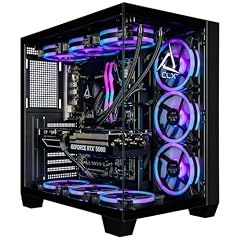
#4. CLX Set Gaming PC - Best High-End
$4,299.99 (as of 10/22/2026 14:06 PDT - Details)
#4 out of 18
Best High-End
Best High-End
- RTX 5080 with 16GB graphics memory
- 64GB RAM
- 2TB storage
- Intel Core Ultra 7 270K CPU
- 2TB storage is less than the 5TB pick
- 64GB RAM is equal to another pick, not unique
- CPU
- Intel Core Ultra 7 270K
- GPU
- GeForce RTX 5080
- GPU memory
- 16 GB
- RAM
- 64 GB
- Storage
- 2000 GB
- OS
- Windows 11 Home
This high-end pick states an RTX 5080 with 16GB of graphics memory, 64GB of RAM, and a 2TB SSD, making it the most memory-heavy machine in the top section. The 64GB RAM leaves ample room for game, stream, capture, and background tasks.
Who it suits
- Players who want the most RAM and a high-end RTX 5080
- Players who keep a large game library in mind
Skip it if
- Players who don't need 64GB of RAM
- Players who prefer a smaller storage footprint
Verdict: A high-end pick with 64GB RAM and an RTX 5080 with 16GB graphics memory.
#5. Witrigs Gaming PC Desktop Computer Ryzen 7 4700LE RTX 5060 8GB GDDR7 - Best Value
$1,099.88 (as of 10/22/2026 10:07 PDT - Details)
#5 out of 18
Best Value
Best Value
- RTX 5060 with 8GB graphics memory
- 16GB RAM
- 1TB storage
- Windows 11 stated
- 8GB graphics memory is the least in the top picks
- 16GB RAM is the minimum here
- CPU
- AMD Ryzen 7 4700LE
- GPU
- RTX 5060
- GPU memory
- 8 GB
- RAM
- 16 GB
- Storage
- 1000 GB
- OS
- Windows 11
It has the highest spec score per dollar among the machines considered. It pairs an RTX 5060 with 8GB of graphics memory and 16GB RAM, with a 1TB SSD. The stated specs offer a discrete card and enough memory for light multitasking.
Who it suits
- Players who want a discrete RTX card at a lower price
- Players with a modest game library
Skip it if
- Players who want more than 16GB RAM
- Players who need more than 8GB VRAM
Verdict: A value-oriented pick that states a discrete GPU and enough RAM for light gaming.
#6. The Horizon Autherium Dragon RGB I9 RTX Gaming PC || 64GB RAM || 5TB - Best for Streaming
$3,199.99 (as of 10/22/2026 10:07 PDT - Details)
#6 out of 18
Best for Streaming
Best for Streaming
- 64GB RAM, the most here
- 5TB storage, the largest here
- RTX 5070 with 12GB graphics memory
- Windows 11 Pro stated
- 12GB graphics memory is less than the 16GB picks
- Intel Core i9 is not specified with a model number
- CPU
- Intel Core i9
- GPU
- RTX 5070
- GPU memory
- 12 GB
- RAM
- 64 GB
- Storage
- 5000 GB
- OS
- Windows 11 Pro
This streaming pick holds 64GB of RAM, tied for the most among these picks, and 5TB of storage, the largest. The RTX 5070 states 12GB of graphics memory, and the Intel Core i9 CPU is listed. The large RAM and storage suit a player who runs a game, a stream, and capture software together.
Who it suits
- Streamers who keep many games installed and many programs open
- Players who want Windows 11 Pro
Skip it if
- Players who need 16GB graphics memory
- Players who want a more specific CPU model
Verdict: A streaming-focused pick with 64GB RAM and 5TB storage.
#7. KOTIN Gaming PC - Best AMD Radeon
$2,199.99 (as of 10/22/2026 16:08 PDT - Details)
#7 out of 18
Best AMD Radeon
Best AMD Radeon
- Radeon RX 9070 XT with 16GB graphics memory
- 32GB RAM
- Ryzen 7 9700X CPU
- Windows 11 Home stated
- 1TB storage is smaller than the 5TB pick
- 32GB RAM is less than the 64GB picks
- CPU
- AMD Ryzen 7 9700X
- GPU
- Radeon RX 9070 XT
- GPU memory
- 16 GB
- RAM
- 32 GB
- Storage
- 1000 GB
- OS
- Windows 11 Home
This AMD pick pairs a Radeon RX 9070 XT with 16GB of graphics memory and a Ryzen 7 9700X CPU. Its 32GB RAM and 1TB storage give a balanced setup for gaming with a large texture library.
Who it suits
- Players who prefer AMD Radeon graphics
- Players who want 16GB VRAM at a mid-range price
Skip it if
- Players who need more than 1TB storage
- Players who want an NVIDIA card
Verdict: A strong AMD Radeon pick with 16GB VRAM and 32GB RAM.
#8. msi Aegis ZS2 Pink Gaming Desktop PC - Best From a Major Brand
$3,402.44 (as of 10/22/2026 17:08 PDT - Details)
#8 out of 18
Best From a Major Brand
Best From a Major Brand
- RTX 5080 with 16GB graphics memory
- Ryzen 9 9900X CPU
- 32GB RAM
- 2TB storage
- 32GB RAM is less than the 64GB picks
- 2TB storage is smaller than the 5TB pick
- CPU
- AMD Ryzen 9 9900X
- GPU
- GeForce RTX 5080
- GPU memory
- 16 GB
- RAM
- 32 GB
- Storage
- 2000 GB
- OS
- Windows 11 Home
As a major-brand pick, this MSI machine states an RTX 5080 with 16GB of graphics memory, a Ryzen 9 9900X, 32GB RAM, and 2TB storage. Its specs match the high-end tier while carrying a recognized brand name.
Who it suits
- Players who want a major brand prebuilt with high-end specs
- Players who value 2TB storage
Skip it if
- Players who need more than 32GB RAM
- Players who want a 5TB storage option
Verdict: A major-brand pick with an RTX 5080 and 16GB VRAM.




More picks: $999 to $1,499
#9. Gaming PC Desktop Computer Ryzen 7 8700F RTX 5060Ti 16GB DDR5 RAM - 16GB VRAM in a budget section
#9 out of 18
16GB VRAM in a budget section
16GB VRAM in a budget section
- RTX 5060 Ti with 16GB graphics memory
- 16GB RAM
- 1TB storage
- Windows 11 stated
- 16GB RAM is the same as the budget picks
- 1TB storage is not the largest in the list
- CPU
- AMD Ryzen 7 8700F
- GPU
- RTX 5060 Ti
- GPU memory
- 16 GB
- RAM
- 16 GB
- Storage
- 1000 GB
- OS
- Windows 11
In the first budget section, this pick stands out with 16GB of graphics memory on an RTX 5060 Ti, alongside 16GB of RAM and a 1TB SSD. That places it ahead of the 8GB picks in the same section.
Who it suits
- Players who want 16GB VRAM without moving to a higher price band
- Players with a moderate game library
Skip it if
- Players who need more than 16GB RAM
- Players who want a 2TB or 5TB storage
Verdict: A budget-section pick that states 16GB graphics memory.
#10. HP OMEN 45L Gaming Desktop - 16GB VRAM with a Core Ultra 7
$1,829.99 (as of 10/22/2026 16:06 PDT - Details)
#10 out of 18
16GB VRAM with a Core Ultra 7
16GB VRAM with a Core Ultra 7
- RTX 5060 Ti with 16GB graphics memory
- Intel Core Ultra 7 265KF CPU
- Windows 11 Pro stated
- 1TB storage
- 16GB RAM is the minimum here
- 1TB storage is not the largest
- CPU
- Intel Core Ultra 7 265KF
- GPU
- RTX 5060 Ti
- GPU memory
- 16 GB
- RAM
- 16 GB
- Storage
- 1000 GB
- OS
- Windows 11 Pro
This HP OMEN also states 16GB of graphics memory on an RTX 5060 Ti, with an Intel Core Ultra 7 265KF and 16GB RAM. It sits in the same budget section with a higher-specified CPU than the other 16GB pick there.
Who it suits
- Players who want a major-brand OMEN with 16GB VRAM
- Players who prefer Windows 11 Pro
Skip it if
- Players who need 32GB RAM
- Players who want more than 1TB storage
Verdict: A budget pick with 16GB graphics memory and a Core Ultra 7 CPU.
#11. iBUYPOWER Element SE Gaming PC Desktop Computer Intel Core i5 14400F CPU - RTX 5060 with 8GB graphics memory
#11 out of 18
RTX 5060 with 8GB graphics memory
RTX 5060 with 8GB graphics memory
- RTX 5060 with 8GB graphics memory
- 16GB RAM
- 1TB storage
- Windows 11 Home stated
- 8GB graphics memory is the least in this section
- 16GB RAM is the same as several others
- CPU
- Intel Core i5-14400F
- GPU
- RTX 5060
- GPU memory
- 8 GB
- RAM
- 16 GB
- Storage
- 1000 GB
- OS
- Windows 11 Home
This iBUYPOWER pick in the first budget section uses an RTX 5060 with 8GB of graphics memory and a Core i5-14400F, backed by 16GB RAM and 1TB storage.
Who it suits
- Players who want a named RTX 5060 at a budget price
- Players with a small library
Skip it if
- Players who need 16GB VRAM
- Players who want more than 16GB RAM
Verdict: A budget-section pick with an RTX 5060 and 8GB VRAM.


More picks: $1,500 to $1,999
#12. ASUS ROG G700 - Discrete RTX 5060 in a mid-tier section
$1,699.00 (as of 10/22/2026 13:07 PDT - Details)
#12 out of 18
Discrete RTX 5060 in a mid-tier section
Discrete RTX 5060 in a mid-tier section
- RTX 5060 discrete GPU
- Intel Core Ultra 7 265F CPU
- Windows 11 Home stated
- 1TB storage
- Graphics memory not stated by the seller
- 16GB RAM is the minimum in this section
- CPU
- Intel Core Ultra 7 265F
- GPU
- GeForce RTX 5060
- RAM
- 16 GB
- Storage
- 1000 GB
- OS
- Windows 11 Home
This ASUS ROG G700 sits in the second budget section with an RTX 5060 and an Intel Core Ultra 7 265F, 16GB RAM, and 1TB storage. The listing does not state the graphics memory amount, so the pick is compared on the other stated specs.
Who it suits
- Players who trust the RTX 5060 name without needing VRAM details
- Players who want a major-brand ASUS
Skip it if
- Players who need a stated graphics memory amount
- Players who want 32GB RAM
Verdict: A mid-tier pick with an RTX 5060 but unspecified graphics memory.
#13. Thermaltake LCGS View i560T-170 Gaming Desktop - RTX 5060 Ti with 16GB RAM
$1,699.99 (as of 10/22/2026 10:07 PDT - Details)
#13 out of 18
RTX 5060 Ti with 16GB RAM
RTX 5060 Ti with 16GB RAM
- RTX 5060 Ti discrete GPU
- Intel Core i7-14700F CPU
- Windows 11 stated
- 1TB storage
- Graphics memory not stated
- 16GB RAM is the minimum in this section
- CPU
- Intel Core i7-14700F
- GPU
- GeForce RTX 5060 Ti
- RAM
- 16 GB
- Storage
- 1000 GB
- OS
- Windows 11
This Thermaltake LCGS view lists an RTX 5060 Ti (graphics memory not stated) along with an Intel Core i7-14700F and 16GB RAM. It is a mid-tier pick with a Core i7 CPU and a discrete GPU.
Who it suits
- Players who want a Core i7 CPU in a mid-range desktop
- Players who accept an unspecified VRAM amount
Skip it if
- Players who need a stated graphics memory number
- Players who want more than 16GB RAM
Verdict: A mid-tier pick with an RTX 5060 Ti and a Core i7.


More picks: $2,000 to $2,999
#14. iBUYPOWER Element Pro Gaming PC Desktop Computer AMD Ryzen 7 9700X CPU - RTX 5070 with 12GB VRAM and 2TB storage
#14 out of 18
RTX 5070 with 12GB VRAM and 2TB storage
RTX 5070 with 12GB VRAM and 2TB storage
- RTX 5070 with 12GB graphics memory
- 32GB RAM
- 2TB storage
- Windows 11 Home stated
- 12GB graphics memory is less than the 16GB picks
- 2TB storage is less than the 5TB pick
- CPU
- AMD Ryzen 7 9700X
- GPU
- RTX 5070
- GPU memory
- 12 GB
- RAM
- 32 GB
- Storage
- 2000 GB
- OS
- Windows 11 Home
In the third budget section, this iBUYPOWER Element Pro states an RTX 5070 with 12GB graphics memory, a Ryzen 7 9700X, 32GB RAM, and 2TB storage.
Who it suits
- Players who want 32GB RAM and 2TB storage in a mid-to-high price range
- Players who prefer AMD CPU/GPU combo
Skip it if
- Players who need 16GB VRAM
- Players who want more than 2TB storage
Verdict: A third budget section pick with 12GB VRAM and 32GB RAM.
#15. Lenovo Legion T5 30IAS10 90YA0073US Gaming Desktop Computer - RTX 5060 with 8GB VRAM and a Core Ultra 7
$2,299.15 (as of 10/22/2026 17:05 PDT - Details)
#15 out of 18
RTX 5060 with 8GB VRAM and a Core Ultra 7
RTX 5060 with 8GB VRAM and a Core Ultra 7
- RTX 5060 with 8GB graphics memory
- Intel Core Ultra 7 265F
- Windows 11 Pro stated
- 1TB storage
- 8GB graphics memory is the least in this section
- 16GB RAM is lower than other picks here
- CPU
- Intel Core Ultra 7 265F
- GPU
- GeForce RTX 5060
- GPU memory
- 8 GB
- Storage
- 1000 GB
- OS
- Windows 11 Pro
This Lenovo Legion T5 in the third budget section pairs an RTX 5060 with 8GB of graphics memory, an Intel Core Ultra 7 265F, 16GB RAM, and 1TB storage.
Who it suits
- Players who want a Lenovo desktop with a Core Ultra 7
- Players who prefer Windows 11 Pro
Skip it if
- Players who need 32GB RAM
- Players who want more than 8GB VRAM
Verdict: A Lenovo pick with an RTX 5060 and 8GB VRAM in the third budget section.
#16. Thermaltake LCGS View i1470S-170 Gaming Desktop - RTX 5070 with 12GB VRAM and 32GB RAM
$2,393.99 (as of 10/22/2026 10:07 PDT - Details)
#16 out of 18
RTX 5070 with 12GB VRAM and 32GB RAM
RTX 5070 with 12GB VRAM and 32GB RAM
- RTX 5070 with 12GB graphics memory
- 32GB RAM
- Intel Core i7-14700F
- Windows 11 stated
- 1TB storage is the smallest in this section
- 12GB VRAM is not the maximum
- CPU
- Intel Core i7-14700F
- GPU
- GeForce RTX 5070
- RAM
- 32 GB
- Storage
- 1000 GB
- OS
- Windows 11
This Thermaltake LCGS view in the third budget section lists an RTX 5070 with 12GB graphics memory, an Intel Core i7-14700F, 32GB RAM, and 1TB storage.
Who it suits
- Players who want 32GB RAM with an RTX 5070
- Players who prefer an Intel Core i7
Skip it if
- Players who need more than 1TB storage
- Players who want a Core Ultra 9
Verdict: A third budget section pick with 32GB RAM and an RTX 5070.


More picks: $3,000 and up
#17. Alienware Aurora ACT1250 Gaming Desktop + Home Security Essential - RTX 5080 with 16GB VRAM and a Core Ultra 9
$3,149.00 (as of 10/22/2026 13:06 PDT - Details)
#17 out of 18
RTX 5080 with 16GB VRAM and a Core Ultra 9
RTX 5080 with 16GB VRAM and a Core Ultra 9
- RTX 5080 with 16GB graphics memory
- Intel Core Ultra 9 285K
- 32GB RAM
- 2TB storage
- Operating system not stated
- 32GB RAM is less than the 64GB pick
- CPU
- Intel Core Ultra 9 285K
- GPU
- GeForce RTX 5080
- GPU memory
- 16 GB
- RAM
- 32 GB
- Storage
- 2000 GB
In the highest price section, this Alienware states an RTX 5080 with 16GB graphics memory, an Intel Core Ultra 9 285K, 32GB RAM, and 2TB storage. It is one of 2 high-end picks with a 16GB VRAM card.
Who it suits
- Players who want an RTX 5080 and a Core Ultra 9
- Players who accept a missing OS listing
Skip it if
- Players who need a stated operating system
- Players who want more than 32GB RAM
Verdict: A high-end pick with an RTX 5080 and 16GB VRAM.
#18. CLX Set Gaming PC - RTX 5080 with 16GB VRAM and Ryzen 7 9800X3D
$4,069.99 (as of 10/22/2026 14:06 PDT - Details)
#18 out of 18
RTX 5080 with 16GB VRAM and Ryzen 7 9800X3D
RTX 5080 with 16GB VRAM and Ryzen 7 9800X3D
- RTX 5080 with 16GB graphics memory
- AMD Ryzen 7 9800X3D CPU
- 32GB RAM
- 2TB storage
- 32GB RAM is less than the 64GB pick
- 2TB storage is less than the 5TB pick
- CPU
- AMD Ryzen 7 9800X3D
- GPU
- RTX 5080
- RAM
- 32 GB
- Storage
- 2000 GB
- OS
- Windows 11 Home
This CLX Set in the highest price section pairs an RTX 5080 with 16GB graphics memory and an AMD Ryzen 7 9800X3D, along with 32GB RAM and 2TB storage.
Who it suits
- Players who want an AMD CPU with an RTX 5080
- Players who want a current high-end GPU
Skip it if
- Players who need more than 32GB RAM
- Players who want a Core Ultra CPU
Verdict: A high-end pick with an RTX 5080 and a Ryzen 7 9800X3D.


Who this page is for and how to read it
Finding the best gaming PC starts with 3 questions: what you play, on which screen, and how much you want to spend. This page answers them as a best prebuilt gaming PC guide for anyone who wants a gaming desktop that arrives assembled, with Windows installed and a graphics card already seated: a first buyer moving up from a console, a parent setting up a machine for a teenager, a laptop owner who wants a larger screen and quieter fans, or someone replacing a tower that no longer keeps up with new games. Every machine is compared on the specifications its listing states and on the live price printed beside each card.
Every statement below traces back to a listing title or to the price table, and where a listing is silent the page says so instead of guessing. That keeps each comparison checkable: open the listing and the same values are there.
The shortlist sits right below this introduction. The long sections after it work as a buying guide in 5 parts: what to spend, which graphics card to aim for, which screen resolution and use the machine should serve, which maker to look at, and then how to finish the setup with parts and peripherals. If you already know you play on a 1080p screen, the 1080p gaming desktops shortlist goes further than this page can, and the 1440p desktop shortlist does the same for the next step up in resolution.
Prices move every day, so this page never writes a price as a fixed figure. Wherever a count or a price appears in the text, it is read from the catalogue when the page is built and shown as it stands at that moment.
How the picks are chosen and ordered
The shortlist draws from desktops whose listing title names a discrete graphics card, meaning an NVIDIA GeForce RTX or GTX card, an AMD Radeon RX card or an Intel Arc card. A machine that relies on graphics built into its processor is left out, because that is the single biggest divide between a gaming desktop and an office one. The pool is also limited to gaming cards with 8GB to 32GB of their own memory, so workstation cards such as the RTX PRO line stay out.
Inside that pool, picks priced from $2,000 up to under $3,000 come first: that band is where this page suggests most players start looking. Within that band, and then among the rest, picks are ordered by stated graphics memory, then by stated RAM, then by stated storage. Ties are broken by the order of the pool file, so the list does not reshuffle between visits. No pick moves up because of its popularity or the maker's name.
Adamant Custom machines are left out of the pool. Their listings describe workstation builds priced far above the rest of the catalogue, and putting them on a gaming shortlist would mislead more readers than it would help.
This ordering rewards what a listing states, not what a machine does once it is on your desk. 2 desktops with the same card, memory and storage can still differ in cooling, power supply quality and noise, and a listing title rarely says anything useful about those. The sections below show how to read around that gap.
What counts as a prebuilt gaming PC here
A prebuilt gaming PC, in this page's terms, is a complete desktop sold as one product: case, motherboard, processor, memory, storage, power supply and graphics card, with an operating system installed. Monitors, keyboards and mice may or may not be in the box, and the listing is the only place to find out.
Full-size towers make up most of the catalogue. Small form factor machines, the compact boxes that fit beside a monitor or under a television, are a separate group; the small gaming PC shortlist covers those that state a discrete graphics card and at least 16GB of RAM.
3 kinds of desktop sit outside this page. Office desktops without a discrete card are one. Workstations built around professional cards are another, and their listings often run to hundreds of gigabytes of memory and many terabytes of storage. The third is any machine whose title does not name its graphics card at all: it may well be a gaming machine, but the page cannot tell, and it does not place a machine on a list by guesswork.
Refurbished and renewed machines appear in the catalogue when their listing says so. Check that word in the title and on the listing itself before you order, because it changes what you should expect from the warranty and the condition.
Prebuilt or build your own
Building a desktop from parts gives full control over every component, and many buyers enjoy the work. A prebuilt trades that control for convenience: one box, one order, one warranty contact, and a machine that should boot the day it arrives. For a first gaming PC, or for anyone who would rather spend the evening playing than routing cables, that trade often makes sense.
The price gap between the 2 paths changes with the market for each part, so this page does not claim that one is always less expensive. What it can say is where a prebuilt saves effort and where it can cost you later.
- Saved effort: no part matching, no driver hunt on day one, no operating system to install, and no risk of a bent pin or a missed power cable during assembly.
- Possible cost: the listing may name the graphics card and processor but stay silent on the power supply, the motherboard and the memory layout, which are exactly the parts that decide how far the machine can be upgraded.
- Possible cost: some makers use their own case and board designs, which can limit which parts fit later. The listing or the maker's support page is where to check.
- Middle path: buy a prebuilt with a strong card and processor now, then swap the parts that matter to you over time. The Build and setup part of this page links a shortlist for each component.
If the idea of choosing parts appeals to you, start with the processor, since it decides the motherboard socket and the memory type. The processor shortlist for gaming is the natural first stop, followed by the card itself.
How much to spend: the price windows
The site splits prebuilt gaming PCs into price windows one hundred dollars wide. A window called under $1,000 holds machines priced from one hundred dollars below that figure up to just below it; it is not a list of everything cheaper. That narrow width keeps each shortlist honest: a machine in a window competes with machines at almost the same price, so the comparison is about what the extra hundred dollars buys rather than about whether a far dearer machine is better.
The windows run from under $500 to under $3,000, then 2 open-ended groups take over: machines at $3,000 or more, and machines at $5,000 or more. Prices are the live price on each card, read within the last day, so a machine can drift into a neighboring window from one week to the next.
A practical way to use the windows is to set a ceiling first, then look one window below it. Because each window is narrow, the machine just under your ceiling and the one a hundred dollars cheaper may differ by a single part, and the cheaper one can leave money for a monitor or a better headset.
The 4 sections that follow walk through the windows from the lowest to the highest and say, in words, what the listings in each range tend to state. The table after them shows how many priced machines each window holds today and the median price of each, read live.
Entry level: under $500 to under $1,000
The lowest windows are thin, and the listings in them often stretch the word gaming. In the 2 lowest windows, the few machines on offer tend to state 16GB of RAM and a 512GB drive but rarely name a current graphics card; read the under $500 shortlist with that in mind, and treat the under $600 picks the same way. Older cards such as the RTX 2060 show up here.
One step up, the picture changes slightly. Titles in the under $700 window and the under $800 window name cards such as the RTX 3050, the GTX 1660 family, the RTX 2060 and RTX 2070, and the Radeon RX 6500 XT, with graphics memory stated between 4GB and 8GB. Storage of 512GB or 1TB is typical of the titles, and some still state Windows 10.
The under $900 group and the under $1,000 shortlist are where 8GB graphics memory statements become easy to find. The RTX 3060 Ti, the RTX 5050, the Radeon RX 6600 and RX 7600 and the Radeon RX 9060 all appear in titles across these 2 windows.
Competitive players who mostly run lighter online shooters and battle arenas can go far in this range. The esports desktop shortlist narrows the field to machines under $1,000 that state at least 16GB of RAM, and today it holds 47 priced machines.
2 cautions apply to every entry machine. First, a title that names a card without its memory leaves the most important number missing, so open the listing and look for it. Second, 8GB of RAM leaves little room for a modern game with a browser and voice chat open beside it, which is why the esports shortlist asks for 16GB; budget for an upgrade if the machine you like states only 8GB.
The middle: under $1,100 to under $2,000
From the under $1,100 window to the under $2,000 window, the catalogue fills out, and the windows start to overlap in what they offer. That overlap is useful: it means a buyer can often find the same graphics card in 2 or 3 neighboring windows and pick the one whose memory and storage fit best.
In the under $1,100 window and the under $1,200 picks, titles name the RTX 4060 family, the RTX 5060 and the RTX 5060 Ti next to older GTX 1660 machines. RAM statements of 8GB still appear, so check that line before anything else.
The under $1,300 shortlist and the under $1,400 group show the RTX 5060 family in their titles, alongside RTX 3060 Ti and RTX 4060 machines from earlier lines. Titles here state 1TB drives, sometimes 500GB, and RAM of 16GB or 32GB, with the odd 8GB machine.
Radeon RX 9060 XT machines join the mix in the under $1,500 window, where some titles also state a 2TB drive.
The under $1,600 picks and the under $1,700 shortlist bring the first RTX 5070 machines, which the listings pair with 12GB of graphics memory.
The top of this band, covered by the under $1,800 window and the under $1,900 group, is where the RTX 5070 and the 16GB version of the RTX 5060 Ti compete.
The under $2,000 picks add Radeon RX 9060 XT and RTX 4060 machines to the same mix. A machine at this level that states 32GB of RAM has more headroom for streaming software and a browser running beside the game than one that states 16GB. If one window looks thin on a given day, its neighbors usually hold machines with the same card. The table in the next sections shows which windows are well stocked right now.
Upper middle: under $2,100 to under $3,000
Past the under $2,000 window, the question shifts from which card to how much of everything else. Most titles in these windows name an RTX 5070, an RTX 5070 Ti or a Radeon RX 9070 XT, and the differences between 2 machines with the same card come down to RAM, storage, the processor and the case.
Titles in the under $2,100 window and the under $2,200 picks name the RTX 5060 Ti, the RTX 5070 and the Radeon RX 9070 XT, with RAM from 16GB to 64GB.
The under $2,300 shortlist and the under $2,400 group look similar, and at the time of writing the RAM statements in the second start at 32GB.
The under $2,500 window still centers on the RTX 5070 and the Radeon RX 9070 XT. In the under $2,600 picks the RTX 5070 Ti appears alongside the RTX 4070 SUPER.
The under $2,700 shortlist adds an RTX 4070 Ti, and a few titles around this price state 96GB of RAM, a sign of a machine that leans toward creative work as much as games.
The under $2,800 group and the under $2,900 picks are where RTX 5080 machines begin, next to well-equipped RTX 5070 Ti builds with 32GB or 64GB of RAM and 2TB drives.
The under $3,000 window closes the run of hundred-dollar windows with the same cards and, in some titles, 96GB of RAM or a 4TB drive.
At this level, look hard at what the extra money buys. A machine with the same card and a larger drive may be worth it if your game library is large; one with the same card and a faster processor may matter less than you expect at high resolutions, where the graphics card does most of the work.
Top end: $3,000 and above
2 open-ended shortlists cover the most expensive machines. The $3,000-and-up shortlist holds machines priced at $3,000 or more, and the $5,000-and-up picks start at $5,000. Both still require a discrete gaming card in the title.
These ranges mix 2 kinds of buyer. One wants the fastest gaming card on the market, NVIDIA's flagship RTX 5090 with 32GB of graphics memory, or an RTX 5080 with a high-end processor and generous memory. The other wants a machine that doubles as a workstation for video, 3D or local AI models, with 64GB to several hundred gigabytes of RAM and many terabytes of storage.
Listings at this level sometimes name professional cards such as the RTX PRO line or RTX 4000 Ada. Those cards are built for certified creative and engineering software, not for games, and the gaming shortlists leave them out. If a title names one, it belongs to a different kind of purchase.
The higher the price, the more the details outside the title matter: the warranty terms, the support channel, the power supply, the cooling and whether the maker publishes a full parts list. Ask for that list before ordering a machine at this price if the listing does not give it.
Every price window at a glance
Each row below is one shortlist window. The count is the number of priced desktops with a discrete graphics card whose live price falls in the window right now, and the median is the middle price among them. Both figures are read when the page is built, so they can change between visits.
| Window | Priced machines now | Median price now |
|---|---|---|
| Under $500 | 4 | $425 |
| Under $600 | 6 | $582 |
| Under $700 | 14 | $672 |
| Under $800 | 14 | $760 |
| Under $900 | 6 | $865 |
| Under $1,000 | 12 | $995 |
| Under $1,100 | 9 | $1,100 |
| Under $1,200 | 17 | $1,189 |
| Under $1,300 | 17 | $1,300 |
| Under $1,400 | 14 | $1,400 |
| Under $1,500 | 12 | $1,499 |
| Under $1,600 | 11 | $1,585 |
| Under $1,700 | 14 | $1,700 |
| Under $1,800 | 12 | $1,774 |
| Under $1,900 | 9 | $1,900 |
| Under $2,000 | 7 | $1,999 |
| Under $2,100 | 6 | $2,084 |
| Under $2,200 | 12 | $2,194 |
| Under $2,300 | 7 | $2,275 |
| Under $2,400 | 13 | $2,400 |
| Under $2,500 | 9 | $2,500 |
| Under $2,600 | 13 | $2,600 |
| Under $2,700 | 5 | $2,690 |
| Under $2,800 | 13 | $2,800 |
| Under $2,900 | 8 | $2,892 |
| Under $3,000 | 8 | $2,999 |
The 2 open-ended groups at the top of the range are left out of the table on purpose. Their live figures include workstation listings that the gaming shortlists leave out, so a count or median for them would describe a different set of machines from the one their shortlists show.
A window with very few machines is not a sign that the range is a poor one to shop in. It often means a new card generation has pushed prices up or down across the boundary, and the window will fill again as listings settle.
Budget planning beyond the machine price
The tower is only part of the spend. A first gaming setup also needs a monitor that matches the card, a keyboard and mouse, a headset if you play online, and possibly a desk and chair that suit long sessions. A prebuilt that sits one window lower can free enough money for a much better screen, and the screen is what you look at every minute.
- Monitor: match it to the card. A 1080p screen wastes a high-end card, and a 4K screen asks a lot of an entry card.
- Input: some prebuilts include a keyboard and mouse in the box. They work, but they are rarely the ones a regular player keeps.
- Audio: a headset with a microphone is the simplest way to join voice chat.
- Software: the operating system is installed, but games, a few accessories and sometimes an online subscription add to the first-month spend.
- Upgrades: if the listing states 16GB of RAM or a 512GB drive, plan for memory or a second SSD later.
None of these items has a fixed price on this page. Each of them has its own shortlist in the Build and setup part, with live prices on the cards.
Choose the graphics card first
In a gaming desktop, the graphics card does most of the work of drawing each frame, and it is the part that is hardest and most expensive to change later. That is why the shortlists on this site start from the card and why the price windows above are best read as a map of which cards sit at which price.
2 numbers on a title tell you most of what you need: the card's model name and its memory in gigabytes. The model name places the card within its family; the memory limits how large and detailed the textures and scenes it holds can be. A card that the title names without its memory is incomplete information, and the listing details or the maker's page should fill the gap.
NVIDIA's current GeForce line in the catalogue runs from the RTX 5050 through the RTX 5060, RTX 5060 Ti, RTX 5070, RTX 5070 Ti and RTX 5080 to the RTX 5090. Earlier RTX 40 and RTX 30 series cards still appear in many titles, and so do some GTX 16 series cards. On the AMD side, titles name Radeon RX cards from the RX 6500 XT and RX 6600 to the newer RX 9060 XT, RX 9070 and RX 9070 XT.
For the most common entry point in current machines, the RTX 5060 desktop shortlist is a good place to begin. Its filter matches any title that names an RTX 5060, so it includes Ti models too. If you know you want the Ti, the RTX 5060 Ti machines have their own list; today 47 priced desktops state that card.
One detail catches many buyers: the RTX 5060 Ti is sold with 8GB or with 16GB of memory, and both versions appear in listing titles. The two are not interchangeable at higher resolutions, so read the memory figure on the title, not just the model name.
RTX 5070, RTX 5070 Ti and RTX 5080
Above the RTX 5060 family, 3 cards cover most of the middle and upper price windows. They differ in memory and in how much of the card's chip is enabled, and the price gap between machines built around them can be large.
- RTX 5070: the listings pair it with 12GB of graphics memory. It is a common choice for 1440p screens. The RTX 5070 shortlist requires that 12GB figure in the title, which also screens out listings that leave memory unstated.
- RTX 5070 Ti: the listings state 16GB. The RTX 5070 Ti desktop picks draw from 18 priced machines today.
- RTX 5080: also 16GB in the listings, with more of its chip enabled than the 5070 Ti. The RTX 5080 machine shortlist suits buyers aiming at 4K or at high refresh rates on 1440p.
Machines with the RTX 5080 span a wide range of RAM statements in the catalogue, from 16GB up to well over 100GB, because some of them are built as all-purpose creative machines. If you only play games, a 5080 machine with 32GB of RAM and a 2TB drive is a sensible configuration to compare against.
The RTX 5090 sits above all three, with 32GB of graphics memory. Its machines are expensive, and their titles tend to state very large RAM and storage as well. It appears in the open-ended top shortlists rather than in a guide of its own.
Older NVIDIA cards and the Radeon side
Plenty of current listings still name an RTX 4060 or an RTX 3050. The RTX 4060 titles state 8GB of graphics memory, and the RTX 3050 titles state 6GB or 8GB. Today 13 priced desktops name an RTX 4060 family card, and 22 name an RTX 3050.
These cards are a reasonable choice for 1080p play when the machine around them is priced to match. The trap is paying a mid-range price for an older card; compare the machine against an RTX 5060 machine in the same window before ordering.
AMD Radeon machines appear in several windows and are worth a look beside the GeForce ones. Titles that name the Radeon RX 9070 or RX 9070 XT state 16GB of graphics memory, and 44 such machines are priced today. The RX 9060 XT appears in titles with 8GB or 16GB, so the memory figure matters as much as it does for the RTX 5060 Ti.
Intel Arc cards count as discrete cards under this site's rules, but they rarely appear in prebuilt titles in the catalogue. If you find one, read it the same way: model name, memory, then the rest of the machine.
| Card named in the title | Graphics memory stated | Where it usually sits |
|---|---|---|
| RTX 3050 | 6GB or 8GB | Entry windows |
| RTX 4060 and 4060 Ti | 8GB | Entry and lower middle windows |
| RTX 5060 | 8GB | Lower middle windows |
| RTX 5060 Ti | 8GB or 16GB | Middle windows |
| RTX 5070 | 12GB | Middle and upper middle windows |
| RTX 5070 Ti | 16GB | Upper middle windows |
| RTX 5080 | 16GB | Upper windows and the top groups |
| RTX 5090 | 32GB | Top groups |
| Radeon RX 9060 XT | 8GB or 16GB | Middle windows |
| Radeon RX 9070 and 9070 XT | 16GB | Upper middle windows |
Match the machine to your screen resolution
The resolution of your monitor sets how many pixels the card must draw for each frame, and it is the most useful single fact to bring to a gaming PC purchase. The site groups its resolution shortlists by stated graphics memory, because memory is the spec that listing titles state most reliably and the one that grows with resolution.
- 1080p: the 1080p shortlist takes desktops that state exactly 8GB of graphics memory. That class covers the RTX 5060, the RTX 4060 and the 8GB versions of the RTX 5060 Ti and RX 9060 XT.
- 1440p: the 1440p shortlist takes machines that state 12GB to 16GB, the range of the RTX 5070, the RTX 5070 Ti and the 16GB versions of the mid-range cards.
- 4K: the 4K desktop shortlist takes machines that state 16GB to 32GB of graphics memory, which brings in the RTX 5080 and the RTX 5090.
These classes are a filter, not a promise of frame rates. Whether a given game runs smoothly at a given resolution depends on the game, its settings and the rest of the machine, and this page has no measurements of that. What the classes do is keep you from buying a card that is plainly out of step with your screen.
Refresh rate matters too. A 1080p monitor at a high refresh rate can ask as much of a card as a 1440p monitor at a standard one. If your screen is a fast one, read the next class up as well.
If you have not bought the monitor yet, decide on the resolution first and buy the PC to match, not the other way round. The Build and setup part links monitor shortlists by resolution and refresh rate.
Esports, streaming and small spaces
Not every player needs the same machine. 3 uses come up often enough to have their own shortlists, and each one changes which spec deserves the most attention.
Competitive esports titles
Fast online shooters and arena games tend to be light on the graphics card and favor high frame rates over visual detail. A modest card with 16GB of RAM is the starting point the esports shortlist uses, and the money saved on the card can go into a fast monitor and a good mouse.
Streaming while you play
Streaming runs an encoder, a camera, overlays and chat beside the game, which raises the memory need. The desktops picked for streaming state at least 8GB of graphics memory and at least 32GB of RAM. Modern GeForce and Radeon cards include a hardware video encoder, so the card can carry much of the encoding work; the listing seldom says which encoder generation it has, and the card's model name is the way to look it up.
Small rooms and living rooms
A compact machine beside a television or on a small desk asks for a different trade. Small cases have less room for airflow and for future upgrades, and a full-length graphics card may not fit. The small gaming PC list keeps only compact machines that name a discrete card, which leaves out the many mini PCs that rely on integrated graphics.
Processor, RAM and storage in a prebuilt
Once the card is chosen, 3 specs shape how the machine feels day to day. None of them should be ignored, but none of them deserves as much of the budget as the card in a gaming machine.
Processor
Listing titles in the catalogue name AMD Ryzen 5, Ryzen 7 and Ryzen 9 chips and Intel Core i5, i7 and i9 chips across several generations, with a few Threadripper workstation chips at the top. 2 titles can both say Ryzen 7 and describe chips several generations apart, so read the full model number. A model name ending in X3D marks an AMD chip with extra cache, a design AMD aims at gaming.
RAM
The titles state RAM from 8GB to well above 100GB. For gaming, 16GB is the smallest amount the esports and small-PC shortlists accept, and 124 priced machines state exactly that amount today. 32GB gives more room for streaming and for a browser left open beside the game. Memory beyond 64GB mainly helps creative and AI work.
Storage
Titles state drives from 256GB to many terabytes. Modern games are large, so a 512GB drive fills quickly; 1TB is a comfortable start and 2TB leaves room for a larger library. Adding a second SSD later is usually simple in a full-size tower, but check the motherboard's free slots before you count on it.
Operating system
Most titles state Windows 11 Home or Windows 11 Pro, and a few older listings still state Windows 10. Pro adds business features that a home gaming machine seldom needs. A title that names no operating system may ship without one, and that is worth confirming before you order.
Choosing by maker
Prebuilt gaming PCs come from 2 kinds of maker. Large computer companies such as Dell, HP and Lenovo build gaming lines next to their office and laptop ranges. Specialist system builders such as Skytech Gaming, CyberpowerPC and Empowered PC assemble machines from retail parts, often in cases and boards you could also buy separately. MSI sits between the two, as a maker of graphics cards and motherboards that also sells complete desktops.
Neither kind is better by default. The large companies tend to use their own case and board designs, which can make the machine tidy and quiet but limit later upgrades. System builders tend to use standard parts, which makes upgrades easier, and their titles often name more of the parts inside.
| Maker | Cards named in titles | RAM stated | Priced now |
|---|---|---|---|
| Skytech Gaming | GTX 1660 to RTX 5080, Radeon RX 9060 and RX 9070 XT | 8GB to 32GB | 52 |
| Dell | RTX 4060 to RTX 5080 | 32GB to 128GB | 24 |
| CyberpowerPC | GTX 1660 to RTX 5070 Ti, Radeon RX 6500 XT and RX 9060 XT | 8GB to 32GB | 26 |
| Empowered PC | RTX 5060 to RTX 5090, plus RTX PRO cards | 16GB to several hundred GB | 19 |
| HP | GTX 1650 to RTX 5080, Radeon RX 7600 | 8GB to 64GB | 25 |
| MSI | RTX 4060 to RTX 5080 | 16GB to 64GB | 31 |
| Lenovo | RTX 3060 to RTX 5080, Radeon RX 9070 XT, plus RTX Ada workstation cards | 16GB to 256GB | 24 |
The ranges in the table are what titles state at the time of writing; they shift as makers add and retire models. The counts are live.
System builders
The Skytech desktop shortlist covers a builder whose titles span a wide range of cards, from older GTX machines to the RTX 5080. The CyberpowerPC picks cover a similar spread, with machines in the entry and middle windows and titles that state Windows 10 Home or Windows 11 Home.
Empowered PC titles start at the RTX 5060 and run up to the RTX 5090 and professional cards, with very large memory options and Windows 11 Pro throughout. The Empowered PC shortlist sticks to its gaming machines.
Large computer makers
Dell titles in the catalogue name cards from the RTX 4060 to the RTX 5080 with 32GB of RAM or more; Alienware, Dell's gaming brand, is listed separately by its own name. The Dell gaming desktop picks cover the Dell-branded machines. The HP desktop shortlist reaches from GTX 1650 entry machines to RTX 5080 towers.
Lenovo sells Legion gaming towers next to workstation models, and the Lenovo gaming tower picks keep the gaming side. MSI titles name RTX 4060 to RTX 5080 cards with 16GB to 64GB of RAM and drives up to 5TB in some titles; the MSI desktop shortlist covers them.
Other makers appear in the catalogue without a shortlist of their own, among them Acer, Alienware, ASUS, Corsair, iBUYPOWER, Thermaltake and ZOTAC. Their machines still compete in the price, card and resolution shortlists.
How to read a prebuilt gaming PC listing
A prebuilt listing title packs a lot into one line, and makers do not agree on the order. A useful habit is to pull out the same 6 facts from every title, in the same order, before you compare anything.
- The graphics card model and its memory, for example RTX 5070 12GB. This is the fact that matters most.
- The processor model in full, not just its family. Ryzen 7 or Core i7 on its own says little.
- RAM amount and, if stated, its type (DDR4 or DDR5) and how many modules.
- Storage size and type. An NVMe SSD is the norm in current machines; a hard drive alone is a poor fit for a gaming PC.
- The operating system, and whether it is a Home or Pro edition.
- Anything about the box: Wi-Fi, included keyboard and mouse, renewed condition, warranty length.
Titles often add words that sound like specs but are not, such as lighting effects, ready-to-play claims and words like ultra or extreme. They tell you nothing about performance, so skip past them.
When 2 facts conflict, for example a title that says 16GB in one place and 32GB in another, trust neither until the listing's detail table or the maker's page settles it. Conflicts like this can creep into long titles that have been edited over time.
When a listing leaves something out
Silence in a title is not a no. A listing that does not mention Wi-Fi may well have it, and a listing that does not name its power supply certainly has one. The site treats a missing fact as unknown, never as absent, and that is also the most careful way to read a listing yourself.
The facts most often missing from prebuilt titles are the ones that matter for the long run: the power supply's wattage and efficiency class, the motherboard model, the memory speed and layout, the cooler, and the case airflow. Those decide how quiet the machine is, how well it holds its speed under load and how far it can be upgraded.
- Look for a parts list in the listing details or on the maker's own product page.
- Ask the seller a direct question before ordering if a part matters to you.
- Treat a machine whose seller cannot name its power supply with extra caution if you plan to add a larger graphics card later.
Because the shortlists rank only what titles state, a machine with a sparse title can sit lower on a list than a better machine whose seller wrote more. That is a limit of ranking by stated specs, and it is a good reason to check the second and third picks on any list as well as the first.
Comparing 2 machines side by side
Most buying decisions end with 2 machines that look almost the same. A short routine keeps the comparison on the parts that matter.
- Line up the graphics cards first. If they differ, the one with the stronger card and more graphics memory usually wins for gaming, unless the rest of the machine is clearly weaker.
- If the cards match, compare RAM. 32GB over 16GB is worth paying a little for if you stream or keep many programs open.
- Next, compare storage. A 2TB drive over a 1TB drive matters if you keep many large games installed at once.
- Then the processor. At 1440p and 4K, the card does most of the work and a small processor gap matters less; at 1080p with a fast monitor, the processor matters more.
- Last, the things a title rarely states: the power supply, the cooling and the warranty. A small price difference can be worth it for a clearer parts list or a longer warranty.
Keep the live prices in view while you do this. 2 machines in the same price window may differ by tens of dollars, and that gap can buy a larger SSD later. 2 machines a window apart deserve a harder look at what the extra money buys.
3 worked comparisons
The cases below are made up to show the routine at work. They use spec combinations that appear in listing titles, but they do not describe particular products.
Same card, different memory
2 RTX 5060 Ti machines sit in the same window. One title states 8GB of graphics memory and 32GB of RAM; the other states 16GB of graphics memory and 16GB of RAM. For gaming at 1440p, the second is the stronger choice, because graphics memory cannot be added later and system RAM can.
Older card, more of everything else
An RTX 4060 machine with 32GB of RAM and a 2TB drive is priced close to an RTX 5060 machine with 16GB and 1TB. If you play at 1080p and keep a large library installed, the first can make sense. If you plan to keep the machine for several years, the newer card is usually the better base, and RAM and storage can be added.
A big step up in price
An RTX 5070 machine and an RTX 5070 Ti machine sit 2 or 3 windows apart. Both state 32GB of RAM and a 1TB drive. The Ti brings 16GB of graphics memory instead of 12GB, which matters most at 4K and in games with large texture packs. If your screen is 1440p, the 5070 plus a better monitor may give more for the same total spend.
A checklist before you order
- The graphics card model and its memory are named, and they suit your screen resolution.
- The processor model is named in full, not just as a family.
- RAM is at least 16GB, or you have budgeted to add more.
- Storage is an SSD of at least 1TB, or you have room and budget for a second drive.
- The operating system is named and it is the edition you want.
- The listing or the maker's page names the power supply, or the seller has answered when asked.
- Wi-Fi is stated if you will not run a network cable to the desk.
- Renewed or refurbished condition is stated or ruled out.
- The warranty length and the support contact are clear to you.
- The case fits where the machine will live, including space for airflow around it.
A machine that clears every line of this list is a sound base for most players. One that misses several lines may still be a good buy, but it deserves a closer look at the listing and a question or 2 to the seller.
Build and setup: after the tower arrives
A prebuilt is a starting point, not a finished setup. The parts inside can be upgraded over the years, and the things around it, from the monitor to the chair, shape the experience as much as the tower does. This part of the page walks through both, with a shortlist for each component and each peripheral.
The component shortlists help in 2 situations: when a prebuilt arrives with a part you want to improve, and when you decide to build or rebuild a machine yourself. The peripheral shortlists help anyone setting up a desk around a new tower. Each shortlist ranks products by the specs their listings state and shows live prices, the same way the gaming PC lists do.
Before any upgrade, find out what is inside your machine. The maker's support page, the parts list in the listing and the system information tool in Windows will tell you the motherboard, the memory layout and the power supply. Installation steps belong to the maker's manual for each part, and this page does not replace it.
Graphics cards
The graphics card is the most common upgrade in a gaming PC and the one with the largest effect. It is also the one most limited by the rest of the machine: the card must fit the case, the power supply must have enough capacity and the right connectors, and the motherboard must have a suitable slot free.
The graphics card shortlist for gaming covers cards across the price range.
2 narrower lists follow the same resolution logic as the desktop shortlists: the cards picked for 1440p state 12GB of memory, and the cards picked for 4K state 16GB or more.
Measure the free length inside the case and check the power supply's label before you shop. A card that is too long, or that needs a connector the supply lacks, turns a simple upgrade into a larger project. If the prebuilt's maker uses a proprietary case or supply, its support page is the place to confirm what fits.
Processors and motherboards
The processor and the motherboard are a pair. The board's socket decides which processors fit, and its chipset decides which memory type, which PCIe generation and how many drives it supports. In a prebuilt, replacing the processor alone is often possible within the same socket; changing platforms means a new board and often new memory.
For gaming, the AMD processor picks and the Intel processor picks split the field by maker. AMD's chips with extra cache, marked X3D, are aimed at games; Intel's current desktop chips name their tier in the model number, from Core Ultra 5 to Core Ultra 9 and, on older lines, Core i5 to Core i9.
The gaming motherboard shortlist covers boards across sockets. AMD's current desktop socket is AM5, which uses DDR5 memory; the AM5 board shortlist is the place to start for a new Ryzen build.
One caution for prebuilt owners: some large makers fit boards with their own layouts and BIOS. A processor that a standard board supports may not be supported by a maker's board, so check the maker's compatibility list first.
Memory and SSDs
RAM and storage are the friendliest upgrades. Adding memory or a second drive rarely needs more than a screwdriver and the manual, and both can make an older machine feel newer.
RAM
Memory comes in generations that do not mix: a DDR5 board takes only DDR5, and a DDR4 board takes only DDR4. Check which one your machine uses before you buy. The gaming memory shortlist covers kits for current boards, and the DDR4 memory picks serve the many prebuilts that still use the older type.
Matched kits of 2 modules are the usual choice, because desktop boards run memory in pairs. If your prebuilt has 2 free slots, adding a matched kit identical to the one inside is the simplest path; if it has none free, replacing the kit is the way up.
SSDs
Current machines generally use M.2 NVMe drives, and many boards have a second M.2 slot free. The gaming SSD shortlist covers drives for any current board. The PCIe 5.0 drive picks only make sense if the board has a PCIe 5.0 M.2 slot; in an older slot, such a drive runs at the slower speed of that slot.
Power supplies, cases and cooling
These are the parts a prebuilt title says least about, and they decide how quiet, cool and upgradable the machine is. For anyone building a machine from scratch, they are also the parts that are easiest to underbuy.
Power supplies
The power supply must cover the graphics card's needs with room to spare, and it must have the connectors the card asks for. Card makers publish a recommended supply size for each card; use that figure, not a guess. The gaming power supply shortlist covers a range of sizes, and the 850W supply picks cover a common size for mid-range and upper mid-range builds. Wiring and installation belong to the supply's manual.
Cases
A case decides which parts fit and how air moves past them. The gaming case shortlist is the broad list; the airflow-first case picks favor mesh fronts and room for fans.
Many builders choose a mid tower, the size that fits a full-length card and a standard board without taking over the desk, and the mid-tower case shortlist is limited to that size.
CPU coolers
Some prebuilts ship with a basic cooler that is louder under load than an aftermarket one. The CPU cooler shortlist for gaming covers both kinds.
The air cooler picks need no pump and little upkeep; the 360mm liquid cooler picks need a case with a matching radiator mount.
Check the cooler's height against the case and the radiator size against the case's mounts before ordering. Both are on the case maker's spec page.
Monitors
The monitor is where the money spent on the card shows up, and a mismatch between the 2 wastes one of them. Choose resolution first, then refresh rate, then panel type and size.
The gaming monitor shortlist covers all resolutions.
For the class most mid-range prebuilts suit, the 1440p monitor picks are the closer match, and for RTX 5080 and RTX 5090 machines the 4K monitor shortlist is the natural partner.
Refresh rate decides how many frames per second the screen can show. Competitive players who run light games at very high frame rates benefit most from a fast screen, and the 240Hz monitor picks gather screens at that speed or faster. A fast screen only helps if the card can feed it, which is another reason to match the two.
Check the ports as well. Most current cards offer DisplayPort and HDMI outputs, and high refresh rates at high resolutions need a port and cable that support them; the card's and the monitor's spec pages list the versions.
Keyboards, mice and headsets
Input devices are personal, and the right choice depends on hand size, desk space and the games you play. The shortlists rank by stated specs, so they are best used to narrow the field before you decide on feel.
- Keyboards: the gaming keyboard shortlist is limited to mechanical switches. The wireless keyboard picks suit a clean desk or a living-room setup.
- Mice: the gaming mouse shortlist covers wired and wireless models. The wireless mouse picks gather models built for low-delay wireless play.
- Headsets: the gaming headset shortlist covers the broad field, and the wired headset picks suit anyone who never wants to charge one.
A keyboard and mouse bundled with a prebuilt are worth keeping as spares. For long sessions, many regular players end up replacing them with models that fit their hands and their games.
Chairs, desks and webcams
Long gaming sessions make the chair and the desk matter. Neither has a spec that guarantees comfort, so the listings are best read for size, adjustment and weight limits, then compared with your own height and room.
The gaming chair shortlist covers chairs sold in the gaming style. The gaming chairs under $300 sit in one price window, read the same way as the PC windows.
A full-size tower, a large monitor and a wide mouse pad need more surface than a standard office desk. The gaming desk shortlist covers desks sold for that purpose, and the L-shaped desk picks suit corners and setups with a second screen.
Streamers and anyone on video calls should look at the camera too. The streaming webcam shortlist keeps cameras whose listings state 60 frames per second or more, which keeps motion smooth on a stream.
Racing wheels and VR headsets
Some games are best played with dedicated hardware. A racing game with a wheel and pedals, or a virtual reality title with a headset, can change how a PC is used more than any component upgrade.
The PC racing wheel shortlist covers wheels that state PC support. Direct drive wheels, where the motor drives the wheel shaft without gears or belts, sit at the top of the range, and the direct drive wheel picks gather them. Check the desk or stand a wheel will clamp to; a strong wheel needs a firm mount.
PC VR asks a lot of the graphics card, since it draws 2 views at a high refresh rate. The PC VR headset shortlist covers headsets made for a PC, and the VR headsets for gaming list adds standalone headsets that can also play PC VR titles over a cable or a wireless link. Each headset maker publishes the graphics card it recommends; compare that with your machine before buying.
The component and peripheral shortlists at a glance
Each row names one area and what its shortlists filter on, so you can see at a glance which list fits your next step. Every list shows live prices on its cards.
| Area | What the shortlists filter on | Check before buying |
|---|---|---|
| Graphics cards | Gaming use, then 12GB or 16GB and up for the resolution lists | Card length, supply capacity and connectors |
| Processors | Gaming use, split by AMD and Intel | Socket and board support |
| Motherboards | Gaming use, and the AM5 socket | Memory type and M.2 slots |
| Memory | Gaming use, and DDR4 kits | DDR4 or DDR5, free slots |
| SSDs | Gaming use, and PCIe 5.0 drives | Free M.2 slot and its PCIe generation |
| Power supplies | Gaming use, and 850W units | Card maker's recommended size |
| Cases | Gaming, airflow and mid tower | Card length and cooler height |
| CPU coolers | Gaming, air and 360mm liquid | Case clearance and radiator mounts |
| Monitors | Gaming, 1440p, 4K and 240Hz or faster | Card and port support |
| Keyboards and mice | Mechanical, wireless and gaming use | Hand size and desk space |
| Headsets | Gaming use and wired models | Platform and connection |
| Chairs and desks | Gaming style, a price window, L-shaped desks | Size, adjustment and weight limits |
| Webcams | 60 frames per second or more | Mount and lighting |
| Racing wheels | PC support and direct drive | Desk or stand mount |
| VR headsets | PC VR and VR for gaming | Recommended graphics card |
Glossary
Short definitions of the terms that appear in prebuilt gaming PC listings and on this page. They describe what each term means in general, not how any particular product performs.
- Prebuilt: a desktop sold fully assembled, with its parts installed and usually an operating system ready to run.
- Discrete graphics card: a separate board with its own processor and memory for drawing images, as opposed to graphics built into the main processor.
- Graphics memory (VRAM): the memory on the graphics card itself, holding textures and frame data. It cannot be added later.
- RAM: the system memory the processor works from. Unlike graphics memory, it can usually be added or replaced.
- NVMe SSD: a solid-state drive that talks to the processor over PCIe lanes, much faster than a hard drive and than older SATA drives.
- M.2: the small slot on the motherboard that most NVMe drives plug into.
- PCIe generation: the version of the link between the board and a card or drive. Newer generations carry more data, and parts fall back to the slower of the 2 ends.
- DDR4 and DDR5: 2 generations of desktop memory. A board supports one or the other, never both at once.
- Socket: the mount on the motherboard that a processor sits in. AM5 is AMD's current desktop socket.
- Chipset: the motherboard's controller that sets which features, ports and lanes the board offers.
- X3D: AMD's mark for processors with extra stacked cache, a design aimed at games.
- Power supply (PSU): the unit that turns wall power into the voltages the parts use. Its size is given in watts.
- AIO cooler: an all-in-one liquid cooler with a pump, tubes and a radiator in one sealed unit; the number in its name is the radiator length in millimeters.
- Mid tower: the most common desktop case size, between compact cases and full towers.
- Refresh rate: how many times per second a monitor redraws the image, given in hertz.
- Resolution: the number of pixels on a screen; 1080p, 1440p and 4K are the common gaming classes.
- Direct drive: a racing wheel design in which the motor turns the wheel shaft directly.
- PC VR: virtual reality that runs on a PC's graphics card, with the headset acting as the display.
- Renewed or refurbished: a used or returned machine that has been checked and resold, often with a different warranty from a new one.
- Price window: a one-hundred-dollar range used by the site's price shortlists; a window named under $1,000 starts one hundred dollars below that figure.
Frequently asked questions
Is a prebuilt gaming PC worth it compared with building one?
For many buyers, yes. A prebuilt saves the time and risk of assembly and arrives with an operating system and one warranty contact. Building gives full control over every part and makes later upgrades easier to plan. Which one costs less changes with the market for each part, so compare a specific prebuilt with the same parts bought separately before deciding.
How much should a first gaming PC cost?
That depends on your screen and your games more than on a fixed figure. Decide the resolution first, then find the price windows where machines with a matching graphics card appear. The window table on this page shows how many machines each window holds right now and their median price.
Which matters more, the graphics card or the processor?
For most games, the graphics card. It does most of the work of drawing frames, especially at 1440p and 4K. The processor matters more for very high frame rates at 1080p, for strategy and simulation games, and for streaming without a hardware encoder.
Is 16GB of RAM enough for gaming?
It is the amount the site's esports and small-PC shortlists treat as the minimum, and many machines state it. If you stream, keep many programs open or plan to keep the machine for years, 32GB gives more room, and RAM is usually easy to add later.
Can a prebuilt gaming PC be upgraded later?
Usually yes, within limits. Memory and storage are the easiest upgrades. A new graphics card depends on the case size and the power supply. Some large makers use their own case and board designs, so check the maker's support page before planning a big upgrade.
Why does the same card appear at very different prices?
The rest of the machine differs: processor, RAM, storage, case, cooling, power supply and warranty. Listing titles name only some of those parts. Compare machines with the same card using the routine in the side-by-side section, and check what each extra dollar buys.
Do the shortlists include laptops or consoles?
No. Every machine on these shortlists is a desktop. Small form factor desktops are covered when they state a discrete graphics card, but gaming laptops and game consoles are outside this site.
Why are some expensive machines left out?
Adamant Custom machines and desktops built around professional workstation cards are left out of the gaming shortlists, because their listings describe workstations rather than gaming machines. They still appear in the catalogue, but a gaming list is not the right place to compare them.
How often do the prices on this site change?
Prices on the product cards are live prices read within the last day, and the counts and medians in this page's text are read when the page is built. A machine can move between price windows as its price changes.
Blog: questions to settle before you buy
Questions
Which pick has the most RAM?
The Horizon Autherium Dragon and the CLX Set Gaming PC (Intel) both state 64GB of RAM, the highest amount in this guide. For streaming with many background apps, 64GB gives the most headroom. The other picks range from 16GB to 32GB.
Which picks state 16GB of graphics memory?
8 of the 18 picks state 16GB of graphics memory. These include the Alienware RTX 5070 Ti, the CLX RTX 5080 machines, the MSI Aegis, the KOTIN RX 9070 XT, the Evounic and HP RTX 5060 Ti models, and the second Alienware. 4 picks state 12GB, 4 state 8GB, and 2 listings do not state the amount.
How much storage is available across the picks?
The Horizon Autherium Dragon states 5TB, the largest in the list. Most other picks state 1TB or 2TB. The CLX Set and Alienware high-end machines list 2TB. Choose a higher storage if you plan to install many games or keep large libraries.
What does this guide compare?
The guide compares each prebuilt gaming PC on the specifications stated in its listing, such as CPU, GPU, graphics memory, RAM, storage and operating system, and on its live price. The ordering follows the rules described in the method, not any external benchmark. Every claim in the guide traces to the stated specs or to a linked maker page.
Are there any picks with an unspecified graphics memory?
2 picks, the ASUS ROG G700 and the Thermaltake LCGS View i560T, do not state the amount of graphics memory in their listings. The guide notes this in their cons and compares them on the other stated specifications, such as CPU, RAM, and storage.