

Asus GPU Tweak III Update Adds Auto-Shutdown Feature to Protect Your Graphics Card
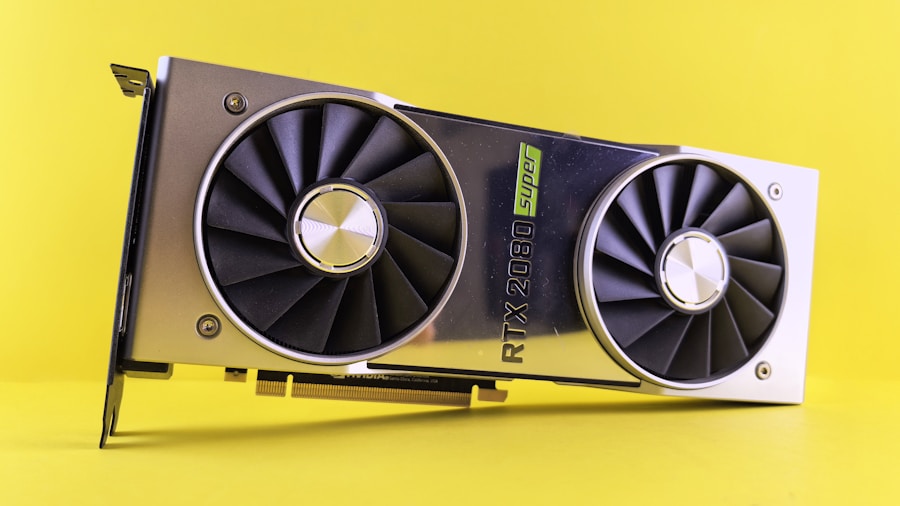
High-end graphics card owners just got a significant safety upgrade. Asus has rolled out version 2.1.8.0 of GPU Tweak III, introducing an automatic shutdown system designed to prevent damage from faulty or overheating power connectors on premium graphics cards. This update marks an important shift from passive monitoring to active hardware protection, giving buyers of top-tier GPUs greater peace of mind during intense gaming or workload sessions.
What’s New in This Update
The centerpiece of this release is a new auto-shutdown feature that monitors power delivery on supported hardware. When the system detects sustained excessive current flowing through the 12V-2×6 power connectors, it will automatically power down your computer instead of simply alerting you to the problem. You can customize how long the elevated current condition must persist before triggering the shutdown, with options ranging from 1 to 5 minutes. This flexibility lets you find the right balance between protection and avoiding false alarms from temporary power spikes.
The current threshold for standard cables is locked at 12.5 amps, but users with Asus’s specialty ROG Equalizer cables get a higher threshold of 18 amps due to those cables’ enhanced specifications. This tiered approach ensures protection is calibrated appropriately for different cable types.
Which Graphics Cards Benefit from This Protection
Not every graphics card qualifies for this new feature. You’ll need a model equipped with Asus’s Power Detector+ hardware to access the auto-shutdown capability. Currently, this includes the ROG Astral GeForce RTX 5090, the ROG Astral LC GeForce RTX 5090, the ROG Astral GeForce RTX 5080, and the ROG Matrix GeForce RTX 4090. As newer premium models release, Asus may expand this roster, so check the official specifications for your specific card.
If you own one of these high-end cards, this update is worth installing immediately. When you’re investing $1,500 or more in a single component, having automatic failsafe protection is a practical investment in hardware longevity.
The Evolution from Warnings to Action
Before this update, Power Detector+ was limited to issuing warnings when current exceeded safe operational limits. The system would notify users that their 12V-2×6 connectors were drawing dangerous amounts of power at 9.2 amps for standard cables or 17 amps for ROG Equalizer cables. However, warnings alone don’t always prevent hardware damage if users are distracted, gaming intensely, or simply miss the notification.
This new version represents a significant step forward because it stops relying entirely on user intervention. Instead of hoping you notice a warning and shut down your system manually, the software now takes direct action to prevent catastrophic failure. This is especially valuable during overnight rendering tasks, unattended server operations, or extended gaming marathons where you might not be watching system alerts closely.
Why This Matters for Premium GPU Shoppers
The 12V-2×6 connector issue has received increased attention in recent years as graphics cards demand higher power and connectors face stress from both manufacturing inconsistencies and user-applied pressure during installation. A single damaged connector can cause system instability, data loss, or even component failure. Protecting expensive hardware is increasingly important as GPU prices remain elevated, and component failures represent substantial losses.
For buyers considering RTX 5090 or RTX 5080 purchases, this update provides reassurance that Asus is investing in practical safety measures beyond just performance marketing. If you’re shopping for premium graphics cards and prioritize long-term reliability, models with Power Detector+ hardware now offer measurably better protection than competitors’ offerings without this monitoring system.
Practical Takeaways for Your Setup
If you already own a compatible graphics card, download and install this update from Asus’s official support pages. Take a few minutes to configure your preferred shutdown delay timer based on your typical workload and system stability. Most users should find that 3 or 4 minutes provides adequate protection without triggering false shutdowns.
If you’re shopping for a new high-end graphics card, factor in whether the model includes Power Detector+ hardware. While this feature alone shouldn’t dictate your purchasing decision, it’s a meaningful advantage for long-term hardware protection. As you evaluate GPU options during the current market landscape, having built-in safety mechanisms can justify paying slightly more for peace of mind.
This update exemplifies how software and firmware improvements can enhance hardware value long after purchase, giving premium GPU owners tangible benefits beyond just performance improvements.




Write Your Review
No reviews yet. Be the first to share your experience!